YOUR CALENDAR
Your calendar, on your own page.
Visitors pick a day and a time from your real availability, in your colors, on the same page as everything else you do.
Free to start. No credit card needed.
Everything Keepp does, at a glance.
One page that does the job of several tools, so you stop paying for and juggling each one.
One link for everything
Website and link in bio · Links and socials · Maps and opening hours · Menus and videos
Instead of a website and a separate link in bio
Make it unmistakably yours
Custom domain · Templates · Fonts and colors · Motion effects · Scheduled blocks
Instead of Carrd
Get paid on your page
Stripe checkout · Digital downloads · Affiliate links · Promo codes
Instead of Stan Store or Gumroad
Let people book you
Bookings · Deposits · Google Calendar sync · Zoom and Meet links
Instead of Calendly
Never lose a lead
Forms · Verified sign-ups · Star ratings · Response inbox
Instead of Typeform
Answer while you sleep
Live chat · AI answers · Telegram handover · Chat history
Instead of a separate chat widget
Share it anywhere
Custom links · QR codes · Wallet visiting card · A link for every block
Instead of a link shortener and a QR generator
Run it from your AI
AI editor · Claude and ChatGPT · Analytics · Import your page
Instead of hiring a developer or an agency
Every tool you need to showcase, sell and run what you do.
For creators and small businesses, on one page you own.
Free to start. No credit card needed.
YOUR CALENDAR
Only the times you are actually free
Connect Google Calendar once. Every booking on your page checks it each time someone looks, so a visitor can only pick a time that is open today.
GOOGLE CALENDAR SYNC
Your calendar decides what shows.
Anything on your Google Calendar takes that time off the page, and a new booking is written back to it. Buffer time between bookings, a minimum notice, blackout dates for a holiday and a limit on how far ahead people can book keep the open times open.
Times are shown in the visitor's own timezone, so nobody works out the difference themselves.
YOUR CALENDAR
- Dentist10 to 11
- Call with Priya1 to 2
- School run3 to 4
ON YOUR PAGE
- 9:00 AM
- 11:00 AM
- 11:30 AM
- 2:00 PM
- 2:30 PM
MANY BOOKINGS, ONE CALENDAR
A booking for each kind of session.
Make one booking for each thing you offer: a free first call, an hour one to one, a small group. Each has its own length, price, photo and questions, and its own link and QR code. They all read the one calendar you connect, so a time taken in one is gone from the others.
- First session, no charge45 minutesFree
- One to one60 minutes£55
- Small group, four people60 minutes£22
ALL THREE CHECK ONE GOOGLE CALENDAR
HOURS OR DAYS
A calendar that fits what you are booking
A lesson is an hour on a particular day, and a cabin is a run of nights. Each gets the picker that suits it, and the visitor never has to be told which one to use.
TIME-BASED
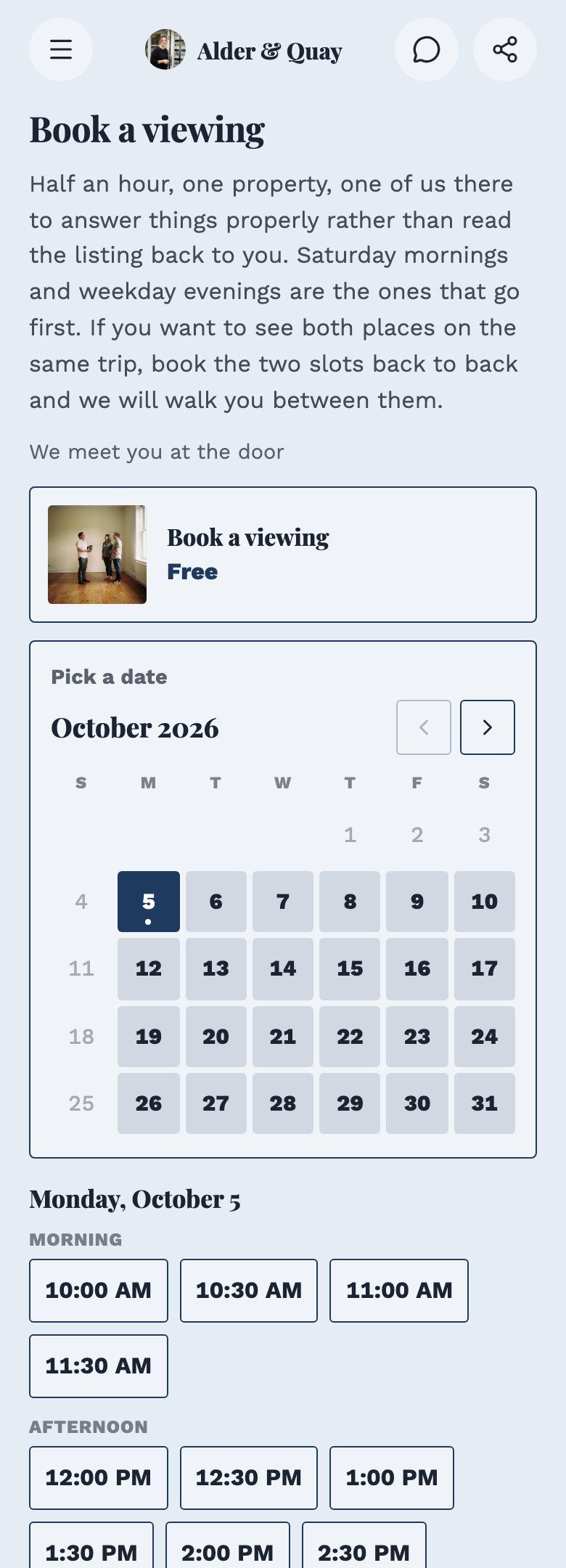
Pick a day, then a time.
The visitor chooses a day on the month view, and the open times for it appear under the calendar, split into morning, afternoon and evening. Your hours, the length of the session and the gap you want between sessions decide which times are offered.
DAY-BASED
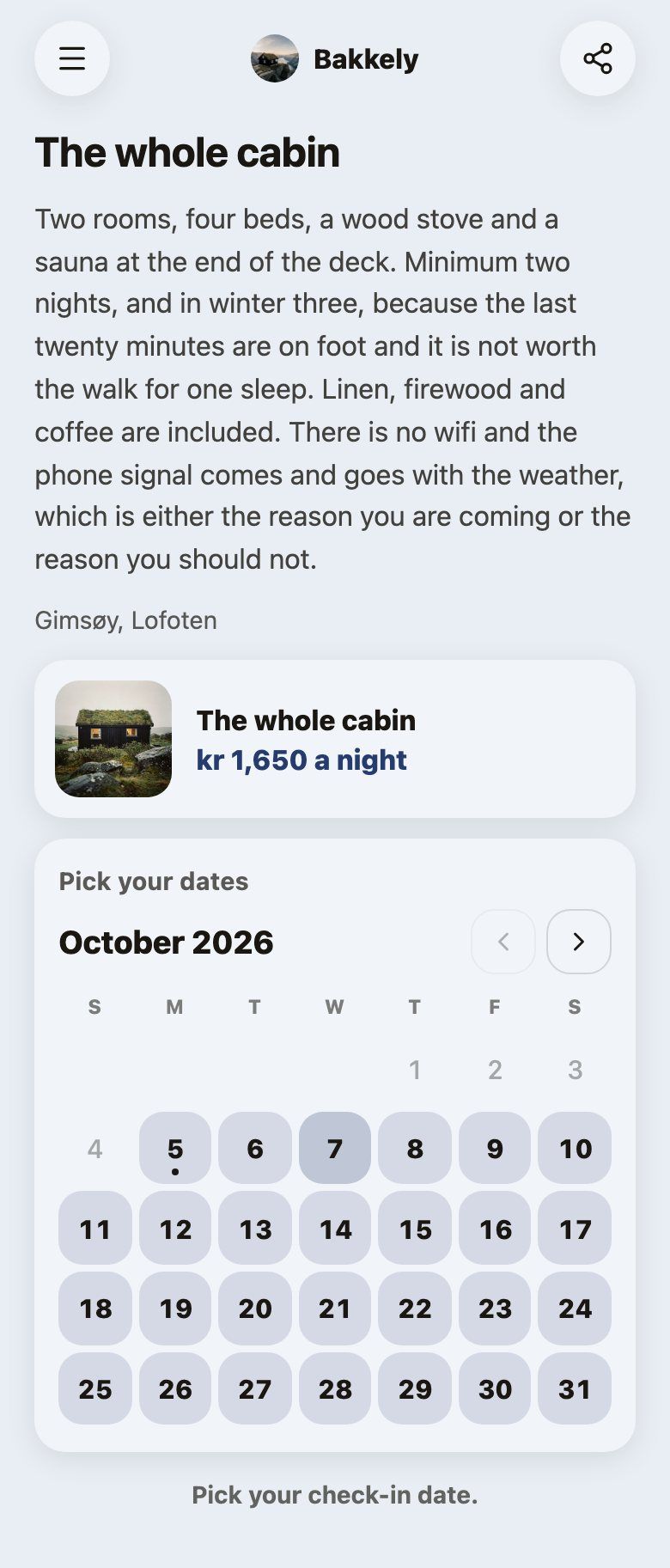
Pick the nights, not an hour.
For a stay, a rental or a retreat, the visitor taps a check-in and a check-out date on the same calendar. You set a minimum stay, a price per night and the dates that are closed, and the days you cannot offer are not shown as free.
YOUR PAGE, YOUR LOOK
The calendar is in your colors
It is part of your page, so it takes on the page's colors, fonts and corners. These are real pages with their own themes, and the calendar on each one is the same booking.
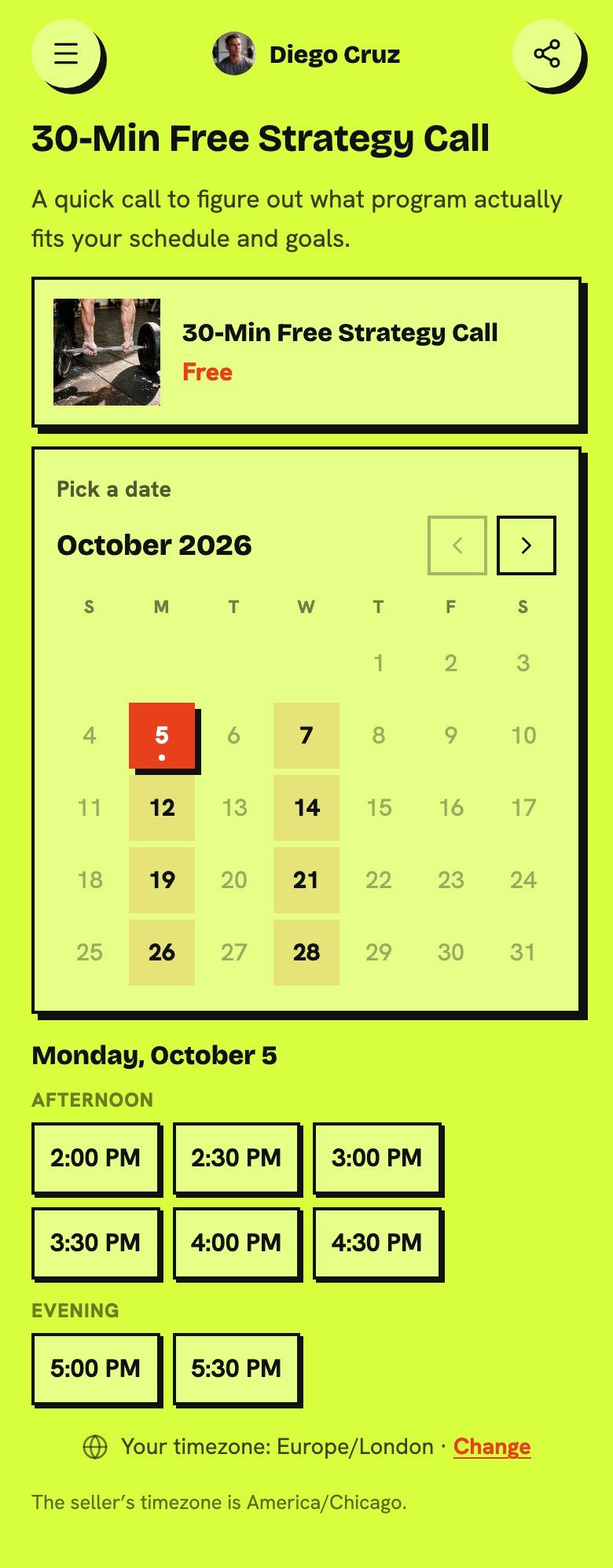
A LOUD ONE
It looks like Diego's page, because it is.
Hard shadows, a bright lime background and heavy type, all carried into the calendar and the time buttons. A visitor who tapped Book never feels they have been sent to somebody else's tool.
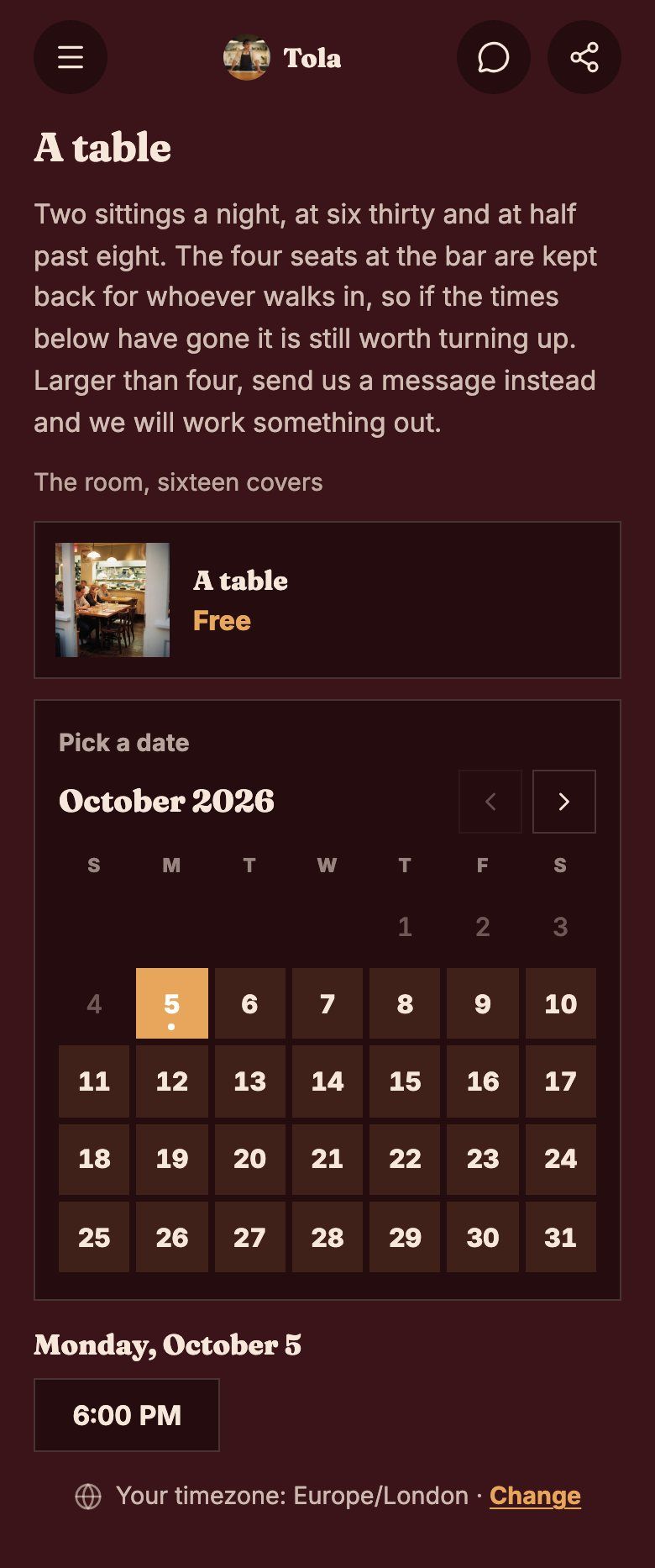
A QUIET ONE
Dark, warm and a little serif.
A restaurant's table booking in the same deep red as its page, with the same type on the dates. The selected day takes the page's accent color.
A SOFT ONE
Rounded, calm, a beach's worth of sand.
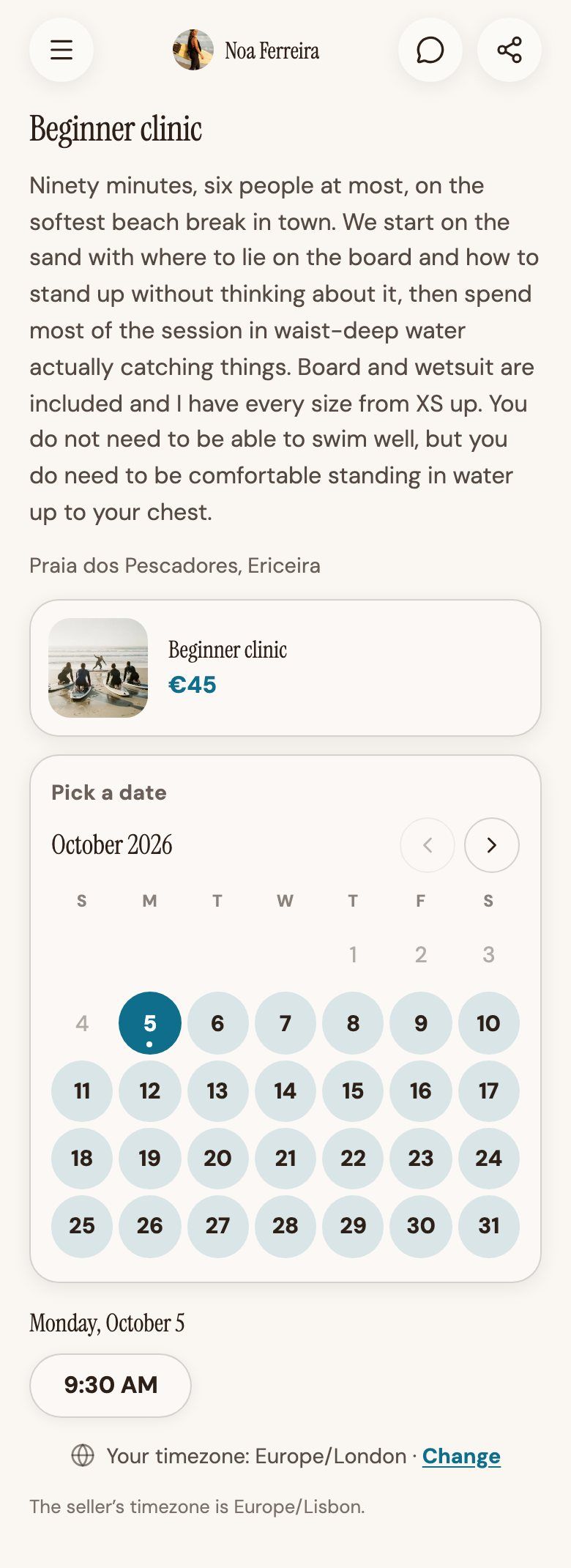
Round date buttons and a condensed serif for a surf coach, with the page's teal on the day you pick. The same booking on a different page is a different thing to look at.
BEFORE AND AFTER THE CLICK
Ask what you need, and get paid
The questions and the payment sit in the same step as the time, so a booking is not complete until you have what you need.
CUSTOM QUESTIONS
Know who is coming before they arrive.
Every booking can ask its own questions after the name, email and phone: short answers, long answers, a choice from a list or several. Mark one required and nobody can book without answering it. The answers are saved with that booking in your dashboard.
YOUR QUESTIONS
What are you training for?
A long answer
Any injuries we should plan around?
Required · a choice from a list
PAYMENT
Paid in the same step as the time.
Charge for a booking, take a deposit or ask for nothing, and choose it per booking. A paid booking is confirmed when the payment goes through, in your own Stripe account, and you are the merchant of record. Each booking can also show your cancellation and refund terms before the visitor confirms.
Paid at booking
The visitor pays by card in Stripe, and the time is theirs once it clears.
Free
No payment. It still holds the time and keeps the visitor's details.
Price shown
The price is on the page and you settle it yourself.
ONE PAGE
The calendar sits on your page, not on its own site
A visitor does not leave to find a scheduling tool, and you do not keep a second login for it.
ONE LINK
Your landing page and your calendar are the same page.
Your bookings, your shop, your links, a form and a chat all sit on the one page at keepp.link/yourname. Visitors do not move between a scheduling site, a link page and a checkout, and you do not run a portal for each. A booking has its own link too, so you can send someone straight to the calendar for one session.
- First session, no chargeBOOKING
- One to oneBOOKING
- Kit and programmesSHOP
- Ask a questionCHAT
- Technique videosLINK
ITS OWN LINK
Link straight to the calendar
The cabin's booking opens on its dates, so a guest who asks whether March is free can check for themselves.
The whole cabin
keepp.link/bakkely/6e0c93d1
In your reply about dates
Ask about the cabin
keepp.link/bakkely/d47b2a6f
In the cabin's guest book
QR CODEBreakfast in the morning
keepp.link/bakkely/1c85f40e
In the message you send before they arrive
AND THE REST OF YOUR PAGE
One page does the rest of it too.
What it costs.
The free plan is a real plan, not a trial with a clock on it. Start there and upgrade when you run into something you need.
Free
Your page and Stripe checkout, with a 5% fee on sales.
- Unlimited sales and bookings with Stripe checkout
- A 5% fee on sales, the lowest on the market on a free plan
- A fully customizable page
- Describe a change and the editor makes it, free for your first 24 hours
- Your keepp.link/handle
- Basic analytics
- Zoom & Google Meet auto meeting links for bookings
Pro
Take enquiries and see what works, on your own domain.
Everything in Free, plus:
- Unlimited sales and bookings with Stripe checkout
- A 3% fee on sales, the lowest rate with the most included
- Describe a change and the editor makes it, for as long as you like
- Build and edit your page from Claude or ChatGPT, or through the API
- Customizable forms for leads, feedback, or anything else you need to ask
- 2,000 actions a month, covering forms, bookings, and orders paid outside Keepp†
- Free and charge-on-your-own pricing, as well as Stripe checkout
- Advanced customization: custom fonts, image backgrounds and motion effects
- Schedule blocks to show for a set time
- Full analytics: visits over time, conversion funnel, date ranges
- Custom domain
- Custom links: 5 short addresses you can point at any block, with visit counts
- Printable QR codes for your page, any block or custom link, in your brand colours
- A digital visiting card for Apple Wallet and Google Wallet, to share in person
Influencer
Live chat, and 0% Keepp fee on sales.
Everything in Pro, plus:
- Unlimited sales and bookings with Stripe checkout
- 0% Keepp fee on sales, so you keep every cent as you scale
- Live chat on your page, answered by AI or by you from Telegram
- 10,000 actions a month, covering forms, bookings, chat replies, and orders paid outside Keepp
- 20 custom links, up from 5
†Actions are forms, bookings, and orders you take payment for yourself. Sales collected through Stripe checkout are always unlimited, on every plan.
Questions people ask.
Does the calendar sync with Google Calendar?
Yes. Connect Google Calendar once and anything already on it takes that time off your page, and each new booking is written back to it. Every booking you make reads that one calendar.
What is the best link in bio tool?
The best link in bio tool is one where people can act on what they see, and on Keepp every link can be a card with a picture, a description and a price, on a page that can also sell, take bookings, collect forms and answer questions in a chat.
A link in bio that takes payments and bookingsBest link in bio tools, compared
Is Keepp free to use?
Yes. The free plan gives you the page, unlimited links and a working Stripe checkout, with no card required and no trial clock. Paid plans lower the commission on sales and add more of the page to your control.
How do I get paid?
Through your own connected Stripe account. You are the merchant of record, so the sale is between you and your customer and the money goes to your account rather than being held by Keepp and forwarded later.
What commission does Keepp take on a sale?
Five percent on the free plan, three percent on Pro and nothing on Influencer. It comes out at checkout rather than arriving as a separate invoice.
What is a good Linktree alternative?
Keepp does what a link list does and then takes payments, bookings and form answers, and answers questions in a chat, on the same page, which is the part a list hands off to another tool.
A real Linktree alternativeHow Keepp compares to link-in-bio and creator tools
Can visitors chat with me on my Keepp page?
Yes. A chat button floats at the bottom right of your page, and a visitor who taps it asks their question without leaving the page. Noa's page at keepp.link/noasurf has one you can try.
Get your page. Start with this.
Free to claim. Live in two minutes. Cancel anytime.