4 Calendly Alternatives for Solo Businesses in 2026
Four Calendly alternatives for coaches, consultants, stylists and small businesses: Cal.com, TidyCal, TinyCal and Keepp, with prices, Google Calendar sync and payments.
Calendly turns your availability into a link, and plenty of people run their whole calendar on it. People start looking for another tool for a few practical reasons. The free plan has one event type and no payments. Paid plans are priced per seat. A booking link is one more login on top of the link page, the checkout and the form tool you already keep.
This list covers four alternatives for one person or a small team, with what each costs and who it suits. Keepp is one of the four, and we make it, so we are telling you up front. Prices come from each tool’s pricing page, checked on 5 October 2026.
What to check in a Calendly alternative
- Calendar sync. Does it read your real calendar every time someone looks, so nobody books a time you are busy?
- Payments. Can the visitor pay when they book, and does the money go to your own account?
- Questions. Can a booking ask what you need to know before the session?
- The booking page. Does it look like yours, or like the tool?
- Where it lives. Is it a separate site with its own login, or part of the page you already send people to?
- Booking types. Can you make one for a free call, one for a paid hour and one for a group?
The four, side by side
| Free plan | Paid from | Good for | |
|---|---|---|---|
| Cal.com | Yes, 1 user, unlimited event types | $12 per user a month | Teams, and people who want open source or self-hosting |
| TidyCal | Yes, 1 calendar connection | $29 once, or $12 a month | A low one-off price for a booking link |
| TinyCal | Yes, up to 3 services | $7 a month | Coaches and consultants with intake forms and group sessions |
| Keepp | Yes, with selling and bookings included | $9.99 a month | A booking on a page that also sells, collects leads and chats |
1. Cal.com
Cal.com is an open-source scheduling tool you can use hosted or run yourself. The free plan is for one user and has unlimited event types and calendars, email and SMS notifications, and Stripe and PayPal payments. Cal.com branding stays on the free plan. Teams costs $12 per user a month when billed yearly, and adds round-robin scheduling, recurring events, routing forms and branding removal.
Best for: teams who need shared availability, and developers who want to self-host or build on an API. Our Cal.com comparison goes through it.
2. TidyCal
TidyCal is a scheduling tool with a lifetime deal. A one-time $29 purchase through AppSumo covers the Individual plan, and an Agency lifetime plan is $79. There is also a free plan and a Pro plan at $12 a month or $99 a year. It connects Google, Office 365 and Apple calendars, takes Stripe payments with a 1% platform fee on Free and the lifetime plans, and supports paid, recurring and package bookings. Pro removes TidyCal branding and adds a custom domain.
Best for: someone who wants a booking link and prefers to pay once.
3. TinyCal
TinyCal is a booking platform for coaches, consultants and solo experts. It syncs with Google Calendar and Outlook, takes Stripe payments before a session, and adds Zoom or Google Meet links automatically. It supports recurring meetings, group sessions with attendee caps and per-attendee payments, and customizable intake forms for goals, background and budget. The free plan is limited to three services, and Light is $7 a month with unlimited services and meetings.
Best for: coaches and consultants who want intake forms and reminders at a low monthly price.
4. Keepp
Keepp gives you a page at keepp.link/yourname, and the booking is a block on it. You connect Google Calendar once, and anything already on it takes that time off the page. Each booking is written back to the calendar, and the availability is read again every time someone opens it.
A booking can be time-based, with a month view and the open times for a day listed under it, or day-based, with a check-in and a check-out date and a price per night. You can make as many bookings as you have kinds of session, a free first call, an hour one to one and a small group, and they all read the one calendar you connect. Each has its own length, price, photo, questions, link and QR code.
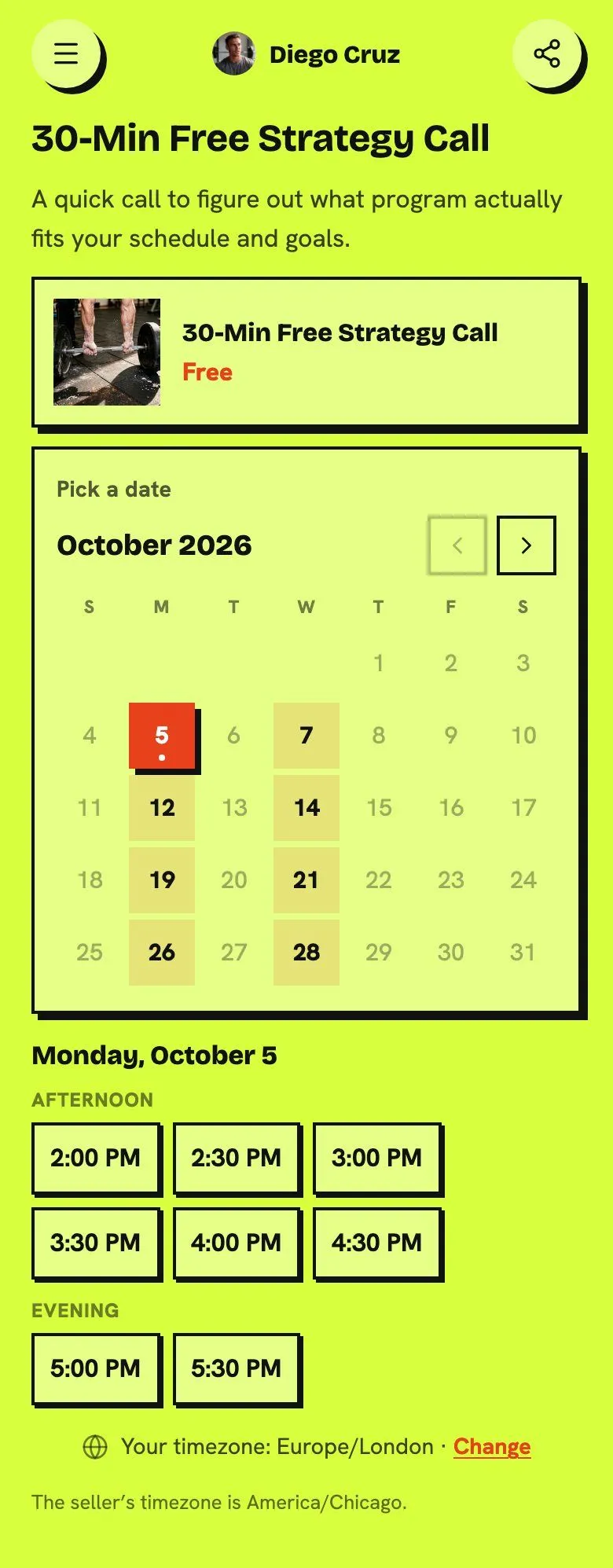
The calendar is part of your page, so it takes on your page’s colors, fonts and corners. That is the booking above, on a page with its own look.
Questions are asked in the same step as the time, and a question marked required has to be answered before the booking is confirmed. Payment is the same step too. You choose, for each booking, whether it is paid at booking, free, or shows a price you settle yourself, and the money goes to your own Stripe account. Zoom and Google Meet links are generated for each booking, and the confirmation carries a link so the visitor can reschedule or cancel without writing to you.
The free plan includes selling and bookings. Keepp’s commission is 5% on Free, 3% on Pro ($9.99 a month) and 0% on Influencer ($24.99 a month), plus Stripe’s own processing fee. Pro adds forms and a custom domain, and live chat is on Influencer.
Best for: anyone who wants the calendar, a shop, a form and a chat behind one link, so there is one landing page to share and one place to manage it. The calendar page shows the booking experience, and the full comparison sets all four beside Calendly.
Which Calendly alternative should you pick?
- You need round-robin scheduling for a team: Cal.com Teams, or stay on Calendly Teams.
- You want to pay once: TidyCal’s lifetime deal.
- You coach or consult and want intake forms for $7 a month: TinyCal.
- You want the booking on your own page, in your own colors, next to your shop and your links: Keepp.
- You only need a single free booking link: Calendly’s free plan has one event type, and Cal.com’s free plan has unlimited ones.
How to move from Calendly to Keepp
- Claim your page with your email and the handle you want.
- Connect Google Calendar, so the availability matches the one you already use.
- Add a booking for each kind of session, with its length, price and questions.
- Connect Stripe if any of them take payment.
- Put the page link where your Calendly link was. You can keep a plain link block to your Calendly page on the Keepp page until you are ready to switch.
Questions people ask
Is there a free Calendly alternative? Cal.com, TidyCal, TinyCal and Keepp each have a free plan. Cal.com’s has unlimited event types, TidyCal’s connects one calendar, TinyCal’s is limited to three services, and Keepp’s includes selling and bookings.
Which Calendly alternative works with Google Calendar? All four. Check each tool’s integrations page if you keep your appointments on Outlook or Apple Calendar.
Which one can take payment when someone books? All four, through Stripe. Cal.com also takes PayPal.
Can I have several booking types on one calendar? Yes, in all four. In Keepp, each one has its own questions, price, link and QR code.
Can I take bookings for a stay instead of an appointment? Keepp has day-based booking, with a check-in, a check-out, a minimum stay and a price per night, alongside time-based booking.
Claim your page at keepp.link, free to start. The pricing page has the full plan comparison.