A Mini Website for Creators and Small Businesses
Bookings, products, and the things you recommend, all in one page that opens for anyone, updates in minutes, and fits in a bio link.
Someone taps the link in your Instagram bio, or the website link on your Google listing. They have already decided you’re worth a look, so the question they arrive with is a narrow one: what do you sell or offer, what does it cost, and how do I book it, buy it, or get hold of you.
A traditional website answers that somewhere around page three. The homepage banner, the story of how the business started, the team, the mission, the archive of everything you’ve ever made. All of it sits between the click and the answer, and the person doing the clicking is on a phone with your competitor one tab away.
You already know the shape of this, because the answer you give people right now is probably “message me” or “let me find that link.” That’s the gap a mini website closes. Not a full site with a developer and a hosting bill: one page, built in an afternoon, that does the specific jobs a small business or a creator actually needs done.
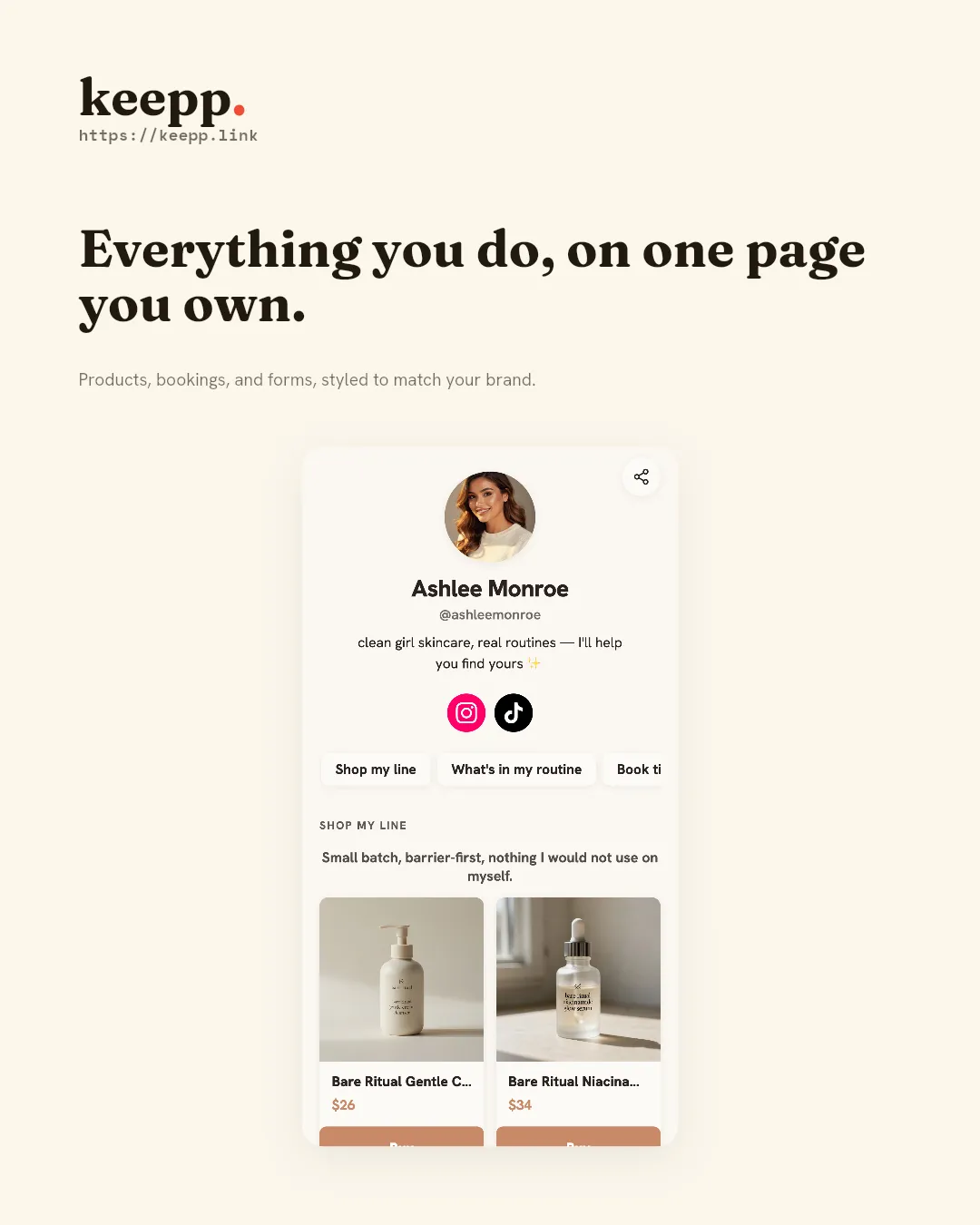
What “mini website” means here
A Keepp page is blocks arranged on a page: a profile at the top, then whatever you need under it: a booking slot, a product, a card for something you recommend, a form, a map. You add blocks, arrange them, and publish. The result is a normal web page at your own link, viewable by anyone, on any device, with no app and no login required to look at it. How your page actually works covers the model in more detail if you want it before you build anything.
It’s not a replacement for a full e-commerce site if that’s genuinely what you need: a large catalog with variants, shipping rules, and inventory across warehouses is its own project. It’s the right size for the much more common case: you need somewhere to send people that does one or two specific jobs well, and you need it live this week, not next quarter.
Four businesses, before and after
Abstract descriptions of “what a page can do” are less useful than seeing the actual gap it closes. Four different situations, same underlying fix.
The coach. Before: a consultant runs discovery calls booked over DM: “what times work for you?”, back-and-forth, a manually sent Zoom link, occasional double-bookings when two conversations land at once. After: a booking block shows real availability pulled from a connected calendar, a client picks a slot, and a Zoom or Google Meet link generates automatically for the call. The booking page for coaches and consultants post walks through the exact setup.
The maker. Before: someone who sells handmade pieces posts a finished item on Instagram, gets “how much?” in the comments, and closes the sale over DM with a Venmo handle or an invoice link typed out by hand, every single time. After: a product block on their page takes payment directly: card details entered right there, no separate cart, no “message me to buy.” The online store for handmade sellers post is written for exactly this case, and selling a product is the mechanical walkthrough.
The restaurant. Before: a small restaurant’s hours, menu, and location live across a Google listing that’s sometimes stale, a PDF someone emails on request, and a phone number for orders. After: a page with a map block showing the real address and hours, a menu people can actually read on their phone, and an ordering flow that doesn’t require a phone call during the dinner rush. Taking food orders online covers the ordering side, and adding a map is the block behind the location and hours.
The influencer. Before: a creator with an affiliate deal on three products and a promo code for a fourth has all of it scattered across pinned comments, story highlights that expire, and a link-in-bio tool that just points to a stack of outbound URLs with no way to show a price or a code. After: cards on their page carry the product image, the price, the promo code, and the outbound link together, grouped however makes sense for their audience. Link-in-bio for influencers and affiliates goes deeper on this.
None of these four needed a developer, a domain purchase, or a “redesign”. They needed the one page that was missing.
How a page actually gets built and published
The mechanics matter because they’re the whole pitch: this has to be fast enough that you actually do it. You start by claiming a handle at keepp.link. That reserves keepp.link/yourhandle as your URL, the same shape as a link-in-bio tool but with an actual page behind it. Claiming your page and setting up your profile are the first two steps, and take a few minutes combined.
From there you add blocks. Each block is one self-contained job: a booking calendar, a product with checkout, a card for something you’re recommending, links and buttons, a form for collecting leads, a chat widget if you want visitors to be able to ask you something directly. If you’re not sure which block fits what you’re trying to do, choosing the right block is built for that exact decision, and once your page has more than a handful of blocks, structuring and grouping them so it doesn’t turn into a wall matters as much as the blocks themselves.
Styling is optional but quick: styling your page with a font pairing that matches your brand takes a few minutes, not a design sprint. Publishing is its own step, and a quick one: everything you do in the editor is a draft nobody else can see, and hitting Publish pushes it out to anyone visiting your link. If you’d rather follow a set path than freestyle it, Keepp’s getting started guide walks a first page from scratch, with a dedicated version for when commerce is the first thing you need working.
If you want to manage the page without opening the editor every time (updating a price, checking today’s bookings, taking a sold-out item down) Keepp also exposes an AI agent interface you can point an assistant at and just ask.
Why one page beats a list of links
A link list is a menu, a stack of URLs that scatter a visitor the moment they tap one. A mini website is a destination. Someone lands on it, sees exactly what you offer, and can act right there: book, buy, or leave their details, without being handed off to five different tools that don’t know about each other.
That matters most in the moment someone is actually interested. Say a customer messages you asking about something you sell. You don’t want to answer with “let me find that link” or a screenshot of a price. You want to send one link that opens, shows the thing, and lets them act on it immediately. That’s true whether the conversation started on Instagram, in a text, over email, or in person with someone pulling out their phone. The page doesn’t care where the visitor came from. A well-placed highlight button giving one clear call to action at the top does a lot of that work on its own.
”Why not just build a real website?”
Because the honest cost of “a real website” isn’t the page itself, it’s everything around it: choosing a hosting provider, wiring up a payment processor, building a booking calendar that actually syncs so you don’t double-book, testing it on a phone, and then maintaining all of that when something breaks. Most of that infrastructure exists to support two or three specific jobs, and a mini website ships those jobs pre-built. If your business genuinely needs a large multi-page site with its own content strategy, a mini website isn’t trying to replace that. For everyone whose actual need is “one page that does one or two things well,” building the infrastructure from scratch is solving a problem you don’t have.
”Why not just use Linktree?”
Because a link list can only ever hand someone off: every button on it opens somewhere else, and every handoff is a place a visitor can quit before finishing the thing you actually wanted them to do. A Keepp page completes the action in place: a product is bought right there, a booking is confirmed right there, a lead’s details are captured right there. That distinction, and the fee structure that comes with it, is covered in full in the Linktree alternative comparison, and the same shape of comparison exists for Beacons and Stan Store if either is what you’re currently using. If you’re coming from a tip jar rather than a link list, Buy Me a Coffee alternative covers that case instead.
None of that requires abandoning the “just a tidy set of links” version if that’s genuinely all you need today: a Keepp page can be exactly that, and stay that way for as long as it’s the right size. The difference is that the day you want to add a booking calendar or start selling something, you add a block instead of migrating to a different platform.
What it looks like once it’s more than links
Once a page is doing real jobs, the details compound. Every product is a shareable link. You can send one item directly instead of pointing someone at your whole page to find it. Getting paid your way covers the different ways money can move (real checkout, free, or pay-outside-Keepp) depending on what fits the sale. And once people are actually landing on the page, understanding your analytics is what tells you whether traffic is converting or just passing through.
If you want to know who’s interested before they buy or book, someone who isn’t ready today but might be next month, a form collects names, emails, or answers to whatever you ask, and everything submitted lands in one place you can search and export, covered in collecting leads and feedback from your page.
Who this is for
If you’re a coach or consultant who takes calls, a maker who sells finished pieces, a creator recommending products you use, or a local business people need to book with (a barber, a studio, a small restaurant) you have the same underlying problem: something you want people to do, and no single place that makes it easy. A mini website is the smallest possible thing that fixes that.
Getting started
Claim your page at keepp.link, add the blocks for what you actually offer, and publish. Ten minutes gets a basic page live; the rest is refining it as you learn what your visitors respond to. Putting your link in your bio is the last step once the page itself is ready: everything else can be added block by block, whenever the next job shows up.
Claim your keepp.link/yourhandle page free, no credit card, live in minutes.