Best QR Code Generator for Small Business (November 2026)
The best QR code generator for small business in November 2026 is Keepp: branded codes that open your own page and don't die when a trial ends.
We check every tool on this list and refresh it every month. Next update: 5 December 2026.
The best QR code generator for small business in November 2026 is Keepp. Your codes open your own page, where customers can book, buy, fill in a form or chat with you, they carry your colour and your photo, and because they point at your page address instead of a generator’s redirect, they keep working for as long as your page does.
That matters because a QR code is printed once and lives for months on flyers, packaging, menus and business cards. Most QR generators make the useful kind of code, the one you can edit and track, through their own short link, and that link only works while you keep paying them. Several turn codes off the day a free trial ends. This list compares the QR code generators small businesses search for most, with what each one caps, charges or switches off, using facts from each tool’s own pages as of November 2026.
Quick picks
- Best QR code generator for small business overall: Keepp. Branded codes for your page, any product, booking or form on it, or a custom link, with scans counted in your Analytics.
- Best QR code generator that doesn’t expire: Keepp. Your code points at your own page address, not at a generator’s subscription.
- Best QR code generator for business cards: Keepp. The code opens your page or your booking calendar, and the same page can sit in Apple Wallet or Google Wallet as a digital card.
- Best QR code generator for wedding invitations: Keepp. Guests scan and land on your wedding page with the details and an RSVP form.
- Best QR code with your logo and brand colours: Keepp. Your photo in the middle, your colour, rounded or dotted styles and a caption frame.
QR code generators, compared
| Tool | Where the code points | What happens if you stop paying | Free plan or trial | Paid plans from |
|---|---|---|---|---|
| Keepp | Your own page, or anything on it | Your page stays live on Free, so a code for it keeps opening it | Free page; 7-day free trial on paid plans | $9.99/mo, month to month |
| QR Code Generator (QRCG by Bitly) | The generator’s short link | ”If you stop paying, the links pause” | 14-day trial; dynamic codes deactivate when it ends | Starter: 2 dynamic codes, 10,000 scans |
| QR TIGER | The generator’s short link | Codes stop working when the plan expires | 3 dynamic codes, 500 scans each | $7/mo |
| Flowcode | The generator’s short link | Not stated | 2 dynamic codes, analytics for 500 scans | $25/mo billed yearly |
| QRCode Monkey | The final address, fixed | Nothing to pay, but nothing to change | Static codes only, no scan stats | Upsells a paid generator for edits and tracking |
| Uniqode | The generator’s short link | ”Your QR Codes will become inactive” | 14-day trial; dynamic codes go inactive after it | About $9/mo, billed yearly |
| Scanova | The generator’s short link | Dynamic codes need an active subscription | 14-day trial; dynamic codes stop when it ends | $5/mo billed yearly, 3 codes |
Keepp is our own product. Prices are in US dollars and come from each tool’s own pricing or help pages.
1. Keepp
Keepp is a website and link in bio in one, for creators and small businesses, and every QR code you make on it opens a part of that page. It’s getting popular with cafés, salons, makers, coaches and shops that print a lot and want every scan to land somewhere a customer can act. You claim your page with Continue with Google and make codes from the same admin where you edit the page.
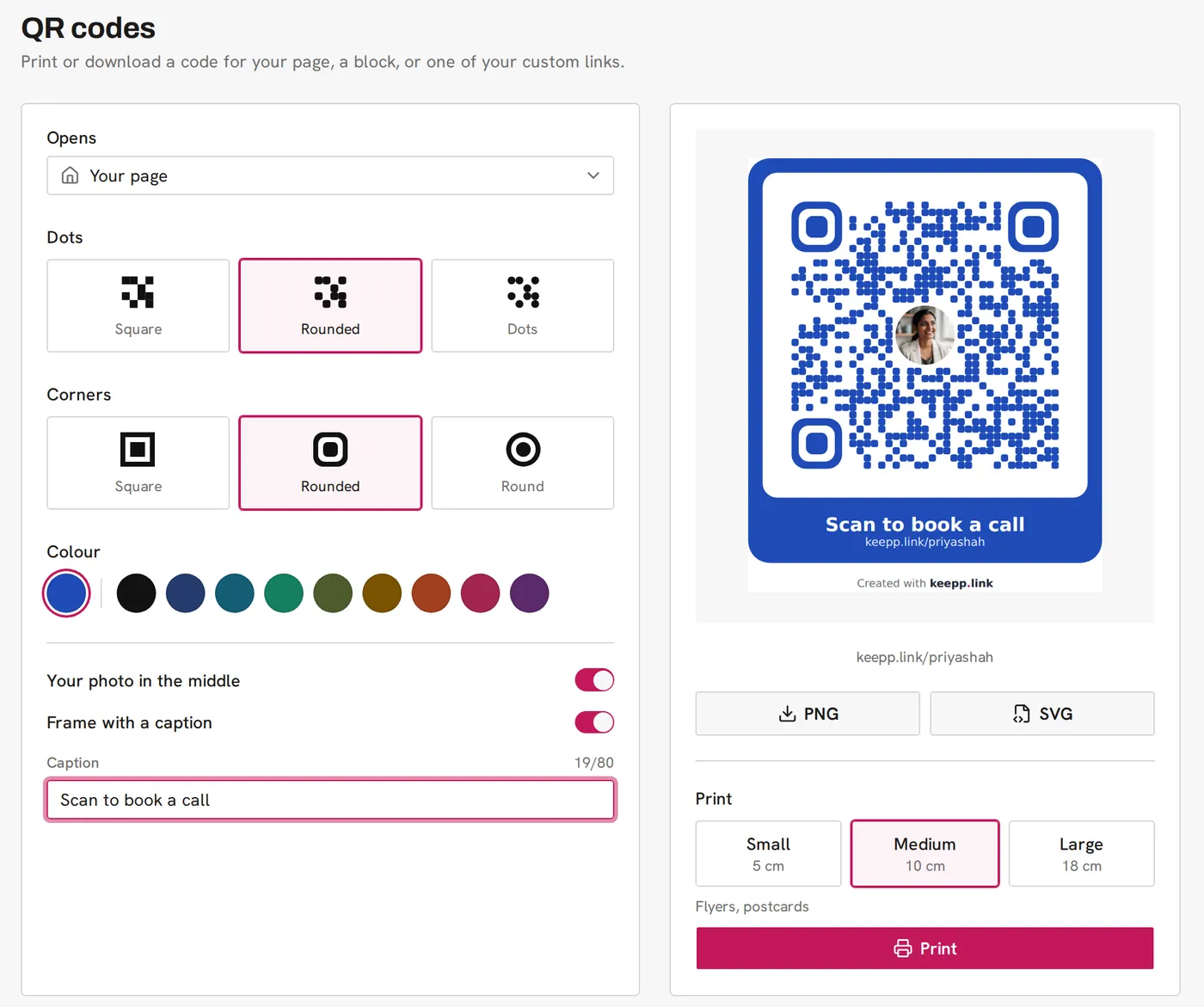
Why Keepp is the best QR code generator for small business:
- A scan lands where customers can act. The code can open your whole page or go straight to one product, one booking, one form or the chat. Someone who scans the flyer can book an appointment, buy the item or ask a question right there, and payments go to your own Stripe account.
- Codes that don’t stop working. A Keepp code points at your own page address. Edit the page as often as you like and the printed code keeps up, because it’s opening the page, not a copy of it. There’s no generator in the middle to switch it off when a trial ends.
- Change where it goes after printing. Make the code from a custom link, like
keepp.link/yourshop/offer, and you can point that link at something new whenever the offer changes. The code on the packaging stays the same. Dynamic QR codes explains how. - It looks like your brand. Square, rounded or dotted styles, matching corners, your page’s brand colour or one of nine dark colours, your photo in the middle and a frame with a caption like “Scan to book a call”. See custom QR codes with your photo and brand colours.
- Ready to print. Download PNG or SVG, or print at a small, medium or large size picked for stickers, flyers or posters. QR code size for printing covers which to use where.
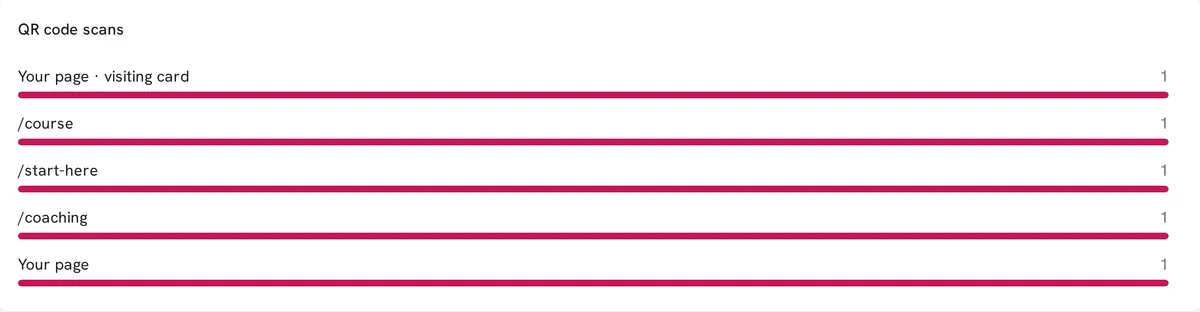
- You see which print works. Every code is counted on its own line in Analytics, next to your page visits, bookings and sales, so you can tell whether the window poster or the flyer brought people in. See how to track QR code scans.
- The same page as everything else. The page your code opens is your website, your link in bio and your digital business card, with your links, shop, bookings, forms and chat. One page to keep current, and every code follows it.
Keepp’s page is free to start. Paid plans are Pro at $9.99 a month and Influencer at $24.99 a month, billed month to month with a 7-day free trial, and if you ever cancel, your page stays live.
2. QR Code Generator (QRCG by Bitly)
QR Code Generator now goes by QRCG by Bitly. It offers a 14-day trial, and its own blog says dynamic codes made during the trial “deactivate automatically when the trial period finishes.” After that, “If you stop paying, the links pause”, so a code already printed on a box or a menu stops opening your page. The Starter plan allows 2 dynamic codes and 10,000 scans; Advanced (50 codes) and Professional (250 codes) are billed yearly only, and cancelling needs 30 days’ notice before the end of the billing cycle.
3. QR TIGER
QR TIGER’s free plan has 3 dynamic codes, each capped at 500 scans, and shows a QR TIGER logo popup. Paid plans are $7 a month for 12 dynamic codes, $16 for 200 and $37 for 600. Its FAQ says that when a plan expires, “it will stop working”, and it keeps your data for a maximum of one year after that.
4. Flowcode
Flowcode’s free plan has 2 dynamic codes and analytics for up to 500 scans. Pro Plus is $25 a month billed yearly for 50 codes and analytics on 6,000 scans, and Growth is $250 billed yearly. Flowcode’s pricing page doesn’t say what happens to your codes if you cancel.
5. QRCode Monkey
QRCode Monkey makes static codes only. Its own page says “you can’t edit the QR code again”, so a code printed with the wrong address, or an address that later changes, is a reprint. There are no scan statistics; for editing and tracking it sends you to a separate paid product, QR Code Generator PRO.
6. Uniqode
Uniqode, formerly Beaconstac, makes static codes free and sells dynamic codes from about $9 a month, with its FAQ saying plans are annual only. Dynamic codes made in its 14-day trial “will become inactive” when it ends, and if you cancel a paid plan, “your QR Codes will become inactive”. Scan limits reset each year, and a custom domain is a $2,000-a-year add-on on Plus.
7. Scanova
Scanova sells plans billed yearly: $5 a month for 3 codes, $9 for 10, $35 for 50 and $75 for 500. Its pricing page says “Your Dynamic QR Code will stop working once the free trial ends” and that dynamic codes “require an active subscription to keep working.” A single dynamic code on its own is a $150 one-time purchase.
Why codes from a separate generator cost you later
An editable, trackable code from a separate generator is a short link they host. You print it, and from then on your flyers, menus and packaging depend on that subscription. Let it lapse, or let a trial end, and every printed copy stops opening anything useful. The code also opens a page that isn’t yours, or your website’s home page, and the customer has to find what they came for.
A Keepp code opens your own page, the place where people already book, buy, fill in a form or chat with you. It’s the same page as your website and your link in bio, so it stays current without any work, and nothing between you and the customer can switch it off.
What changed in November 2026
- This is the first edition of this list. Every price, cap and expiry rule above was checked on each tool’s own pricing, FAQ or help pages on 2 November 2026.
- QR Code Generator is now QRCG by Bitly. The rebrand was announced on its blog in April 2026, and codes made during its trial still deactivate when the trial ends.
FAQ
What is the best QR code generator for small business? Keepp. Your codes open your own page, where customers can book, buy, fill in a form or chat, they carry your brand colour and photo, and every scan is counted in your Analytics.
What is the best QR code generator for business? Keepp, for the same reason: a scan lands on a page that does business, not a generic redirect, and the code doesn’t depend on a separate generator’s subscription.
Is there a QR code generator that doesn’t expire? Yes. A Keepp code points at your own page address, so it works for as long as your page does. QR Code Generator, Uniqode and Scanova turn dynamic codes off when their trials end, and QR TIGER caps free codes at 500 scans each.
Can I change a QR code after printing it? You can change where it goes. On Keepp, make the code from a custom link and point the link somewhere new whenever you want. See dynamic QR codes.
What is the best QR code generator for business cards? Keepp. The code on your card can open your page or your booking calendar, so the person you met can book a call on the spot, and the same page can go into Apple Wallet or Google Wallet as a digital card. See putting a QR code on your business card.
What is the best QR code generator for wedding invitations? Keepp. Print a code on the invitation that opens your wedding page with the day’s details and an RSVP form, and update the page as plans change without reprinting anything. See wedding QR codes for RSVPs.
Can I put my logo in a QR code? On Keepp the middle of the code shows your page’s profile photo, so if your profile photo is your logo, that’s what appears. The code is built with extra error correction so it still scans.
How do I track QR code scans? Keepp counts every scan for you and shows each code on its own line in Analytics, with no tracking links to build. See how to track QR code scans.
Claim your page at keepp.link with Continue with Google, and make your first code from it.
Like what you read? Add Keepp as a preferred source on Google to see more of our posts in your search results.