QR Code Size for Printing: Flyers, Business Cards, Packaging and Posters
What size should a printed QR code be? A practical guide for small businesses: sizes for stickers, business cards, flyers, packaging and window posters, plus where to point each code and what to write next to it.
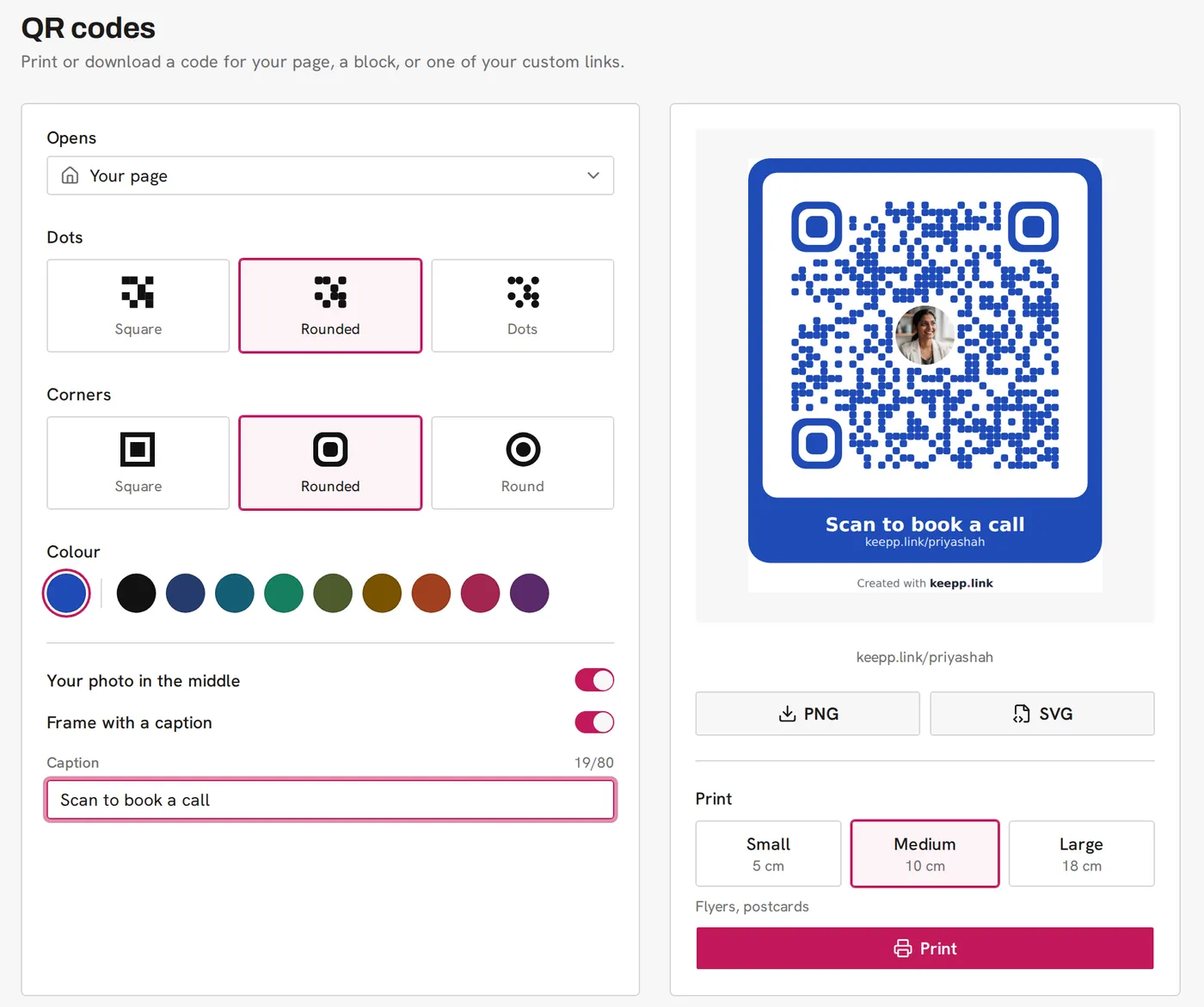
A printed QR code should be at least 2 cm wide for something held in the hand, and about one tenth of the distance it will be scanned from. A business card or sticker works at 2 to 5 cm, a flyer or postcard at about 10 cm, and a window poster read from a couple of metres away at 18 cm or more. Keepp’s QR codes page prints at Small (5 cm), Medium (10 cm) and Large (18 cm), and the PNG and SVG downloads cover everything else.
The size is only half of it. Where the code points and what you write next to it decide whether anyone scans it.
How big should a QR code be?
The rule of thumb printers use is a 10 to 1 ratio: the code should be about a tenth as wide as the distance it is scanned from. A phone held 30 cm from a flyer reads a 3 cm code easily. A poster across a shop needs a much bigger one.
| Where it goes | Scanned from | Code width |
|---|---|---|
| Business card, sticker, label | Hand-held | 2 to 3 cm |
| Table tent, counter card | Arm’s length | 5 cm |
| Flyer, postcard, menu | Hand-held, or on a table | 5 to 10 cm |
| Packaging, product box | Hand-held | 3 to 5 cm |
| Shop window, A3 poster | 1 to 2 metres | 15 to 20 cm |
| Banner, event sign | Across a room | 25 cm and up |
Keepp’s print sizes measure the whole code including its frame, and print one code centred on an A4 page so you can cut it out or use it as a template:
- Small, 5 cm: stickers and table tents
- Medium, 10 cm: flyers and postcards
- Large, 18 cm: posters and windows
For anything else, download the SVG and size it in whatever you use to lay out the print. SVG stays sharp at any size. The PNG is 2048 pixels wide, which prints sharp up to about 17 cm.
Leave a quiet margin
A QR code needs a clear border around it, about four dots wide, with nothing printed in it. Keepp’s codes include that border on white. Don’t crop it off, and don’t place the code on a busy photo or a dark background without its white panel.
Where should the code point?
A code that opens your whole page is fine on a business card. On most print, a code that opens the exact thing the print is about works better.
- Flyer for a class: the booking for that class, so people pick a time straight away.
- Packaging: the product inside, so a reorder is one scan.
- Table tent in a café: the menu.
- Window poster for an event: the signup form.
- Business card: your page, or your booking calendar if that is the one thing you want people to do.
Every product, booking, form and menu on a Keepp page opens as its own page, so you can make a code for each. If the print will be around for a while, make the code from a custom link instead. Then you can change where it goes without reprinting. Dynamic QR codes explains how.
What to write next to it
A code with no words around it gets ignored. Say what happens when someone scans:
- “Scan to book a table”
- “Scan for this week’s menu”
- “Scan to reorder”
- “Scan to join the waitlist”
Keepp’s frame puts your caption, up to 80 characters, directly under the code in your colour, with the page address below it. The address is there for anyone whose camera does not pick up the code. A custom link like keepp.link/yourshop/menu is short enough to type by hand.
Use your colours, keep it scannable
Dark dots on a light background scan best. Keepp’s colour choices are your page’s brand colour and nine dark colours tested for contrast on white, so whatever you pick prints readable. Your photo or logo can sit in the middle. Custom QR codes with your photo and brand colours covers the styles.
Test before you print the batch
- Print one copy at the final size on an ordinary printer.
- Scan it with two different phones, from the distance people will really stand.
- Check that it opens the right thing.
Know whether it worked
Every Keepp code is counted when it is scanned. Analytics shows a QR code scans panel with a count for each code, so you can tell whether the window poster outperforms the flyers. See how to track QR code scans.
Common questions
What is the minimum QR code size? About 2 cm wide for something held in the hand. Smaller than that and older phone cameras struggle.
Can I print a QR code in colour? Yes, as long as the dots are dark and the background is light. Keepp only offers colours that pass that test.
Should I use PNG or SVG for print? SVG, if your printer or design tool accepts it. It stays sharp at any size. PNG is fine up to about 17 cm.
Can one code go on all my flyers? Yes. If the flyers are for different things, give each its own code so you can see which one gets scanned.
Get started
Make and print a QR code walks through the designer and the print sizes. QR codes are part of Keepp’s Pro plan.