Custom Short Links for Your Link-in-Bio Page: keepp.link/you/course
Make a branded short link like keepp.link/yourname/course that opens one product, booking or form on your page. Easy to say out loud, easy to type, and you can change where it points at any time.
A custom short link is a word you choose added to your page address, like keepp.link/priyashah/course, that opens one specific thing on your page. On Keepp you name the link, pick what it opens (a product, a booking, a form, a menu, the chat, or the page itself), and share it anywhere. You can point it somewhere else later without changing the link.
Every block on a Keepp page already has its own link, like keepp.link/yourname/a1b2c3d4. That works well when someone taps it. It is hard to say on a podcast, hard to remember from a slide, and hard to type from a poster. Custom links fix that part.
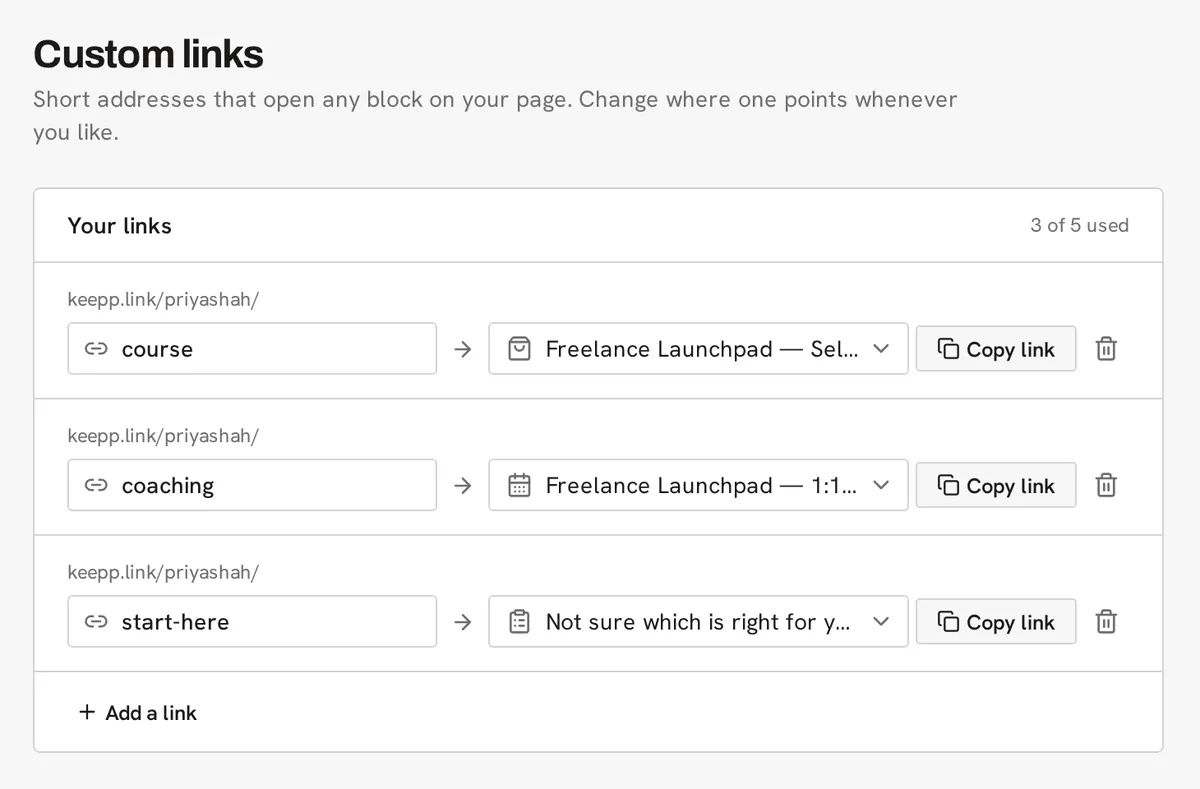
What is a custom short link?
A custom short link, sometimes called a vanity URL or branded link, is a readable address that sends people to one place. Most short links come from a separate link shortener on a separate domain. A Keepp custom link lives on your own page address, so the link people see is your name and a word you chose.
Examples of how people name them:
keepp.link/yourname/coursefor the course you mention in every videokeepp.link/yourname/bookfor your booking calendarkeepp.link/yourname/menufor this week’s menukeepp.link/yourname/waitlistfor a launch signup formkeepp.link/yourname/askfor the chat
Names use lowercase letters, numbers and hyphens, up to 40 characters.
Why use a short link instead of the block’s own link?
Both open the same thing. The difference is where the link has to travel.
Out loud. “Go to keepp dot link slash priya shah slash course” is something a listener can follow. A string of letters and numbers is not.
On screen. A word on a slide or at the end of a video is something people remember long enough to type.
On print. A short, readable address under a QR code gives people a second way in if their camera does not pick up the code.
In analytics. Each custom link has its own visit count, so you can see which link a campaign is sending people through. More on that below.
Can I change where a custom link goes?
Yes, and this is the reason most people set them up. A custom link points at a block, and you can repoint it whenever you like. keepp.link/yourname/offer can open your spring sale today and your summer course next month. Anyone who saved the link, and every place you printed it, follows along.
This matters most for anything you cannot edit after it goes out: a printed flyer, a QR code on packaging, a pinned comment on an old video, a slide in a talk that is already on YouTube. Point the link at whatever is current and the old placements stay useful.
If you take a block off your page, its link does not break. It opens your page instead, so nobody lands on an error.
Does the address bar keep the name?
Yes. When someone opens keepp.link/yourname/course, that is the address they see, and that is what they copy if they share it on. It does not jump to a different URL. The link preview that appears in messages shows the product or booking it points at, with its own title and photo.
Do custom links work on my own domain?
Yes. If you have connected your own domain, your custom links work there too: yourname.com/course opens the same block as keepp.link/yourname/course.
How do I see how many people used each link?
Open Analytics in your admin. The Custom links panel lists each link with how many people opened it in the range you picked.

This is the simplest way to compare where your traffic comes from without setting up UTM tags. Give each placement its own link (one for the podcast, one for the newsletter, one for the poster) and the counts tell you which one worked. If you also print a QR code for a link, its scans show up separately in the QR code scans panel. How to track QR code scans covers that.
How many custom links do I get?
Custom links are part of the Pro plan, with 5 links. The Influencer plan has 20.
Ways people use them
A course creator puts /course in every video description and says it in every outro. When a new cohort opens, the link moves to the new product.
A coach prints /book on a business card. It opens the booking calendar with real availability, so the card books calls.
A café points /menu at the menu block and /catering at a catering enquiry form, and puts both on the counter.
A podcaster uses /ep for whatever the current episode’s sponsor offer is, so they only ever say one link.
A seller at a market makes /stall for the products they bring that weekend, then repoints it on Monday.
Common questions
What is the difference between a custom link and a link shortener? A link shortener gives you a short code on its own domain that redirects somewhere else. A Keepp custom link is a readable name on your own page address, it opens a block on your page, and it shows your page’s own link preview.
Can a custom link point at my whole page? Yes. Pick your page as the target. That is useful as a placeholder you plan to repoint later.
What happens if I delete the product a link points at? The link opens your page instead. Point it at something new whenever you are ready.
Can I use capital letters or spaces? Names are lowercase letters, numbers and hyphens, so they read the same everywhere and nobody has to guess the capitalisation.
Do I need to republish my page after changing a link? No. Links are saved from the Custom links page and take effect as soon as you publish them there. Your page itself stays as it is.
Get started
Create custom links walks through it step by step. To print one as a code, read how to make and print a QR code.