Best Link in Bio with Booking (November 2026)
The best link in bio with booking in November 2026: Keepp puts a booking calendar with Google Calendar sync on the same page as your links and shop.
We check every tool on this list and refresh it every month. Next update: 5 December 2026.
Part of the link in bio guide: What is a link in bio? The complete guide
The best link in bio with booking in November 2026 is Keepp. Your booking calendar sits on the same page as your links, your services, your shop, your forms and a chat, it reads your Google Calendar so nobody books a time you’re busy, and paid bookings are paid the moment the time is picked, into your own Stripe account.
That matters because a booking link in bio usually means two tools: a link page, and a scheduler it sends people off to. Every extra hop loses someone. With Keepp the person who taps your bio sees what you offer and books it right there. This list compares the link in bio tools that take bookings, with what each one charges or locks, using facts from each tool’s own pages as of November 2026.
Quick picks
- Best link in bio with booking overall: Keepp. Bookings, links, a shop, forms and a chat on one page, with real availability from Google Calendar.
- Best link in bio with a calendar: Keepp. Busy times on your Google Calendar are blocked on the page, and each booking is written back to it.
- Best booking link in bio for paid sessions: Keepp. The visitor pays when they pick the time, through Stripe Checkout, and the money lands in your own Stripe account.
- Best booking page for stays: Keepp. Guest houses and retreats take bookings by the night, with a check-in and a check-out date.
Link in bio with booking, compared
| Tool | Paid bookings on the free plan | What paid bookings need | Your own domain | Chat for visitors |
|---|---|---|---|---|
| Keepp | Yes | Nothing extra: 5% fee on Free, 3% on Pro, 0% on Influencer, plus Stripe | Yes | Yes, with handover to you |
| Linktree | No, free sessions only | Pro, $14/mo billed yearly or $17 monthly | Not on any plan | Not found |
| Beacons | Yes, with a 9% fee | 9% fee stays until Creator Plus, $30/mo | From $10/mo | Not found |
| Stan Store | No free plan | Creator, $29/mo or $300/yr | Forwarding only | Not found |
| Bio Sites by Squarespace | Up to 10 appointments a month | No paid tier found | Not found | Not found |
| Lnk.Bio | No | Booking Calendar add-on at $4/mo, or Ultra at $89.99/yr | Ultra, or a $39.99/yr add-on | Not found |
| Creator Store by Planoly | No, free plan is app-only | Planoly plans from $14/mo | Not found | Not found |
| Milkshake | No native bookings | Contact form on Pro | Pro+ only | No |
| Carrd | No, embeds only | Embeds from Pro Standard, $19/yr | Pro Standard | Not found |
Stripe or PayPal processing is charged on top on every tool. Keepp is our own product.
1. Keepp
Keepp is a website and link in bio in one, and it’s getting popular with coaches, stylists, therapists, tutors, guest houses and anyone else whose time is the thing they sell. You claim your page with Continue with Google, add a booking, and it’s live at keepp.link/yourname.
Why Keepp is the best link in bio with booking:
- Bookings live on the same page as everything else. Someone reads your services and prices, looks at your work, and books without leaving. The same page carries your links, a shop, enquiry forms and a chat, so a visitor who isn’t ready to book can still buy something, leave their details or ask a question.
- Real availability. Connect Google Calendar once. Anything already on it blocks that time on your page, and the calendar is read again each time someone opens the booking, so a meeting you added this morning is respected this afternoon.
- The video call is set up for you. Each booking gets its own Zoom or Google Meet link automatically.
- Paid when the time is picked. For a paid session the visitor pays as part of booking, through Stripe Checkout, and the money goes to your own Stripe account. You’re the merchant of record. You can also make a booking free, or show a price and settle it your own way.
- Customers sort out changes themselves. The confirmation has a link to reschedule or cancel, so “can we move this to Thursday?” stops landing in your messages.
- Stays by the night. A booking can be a date range with check-in and check-out and a price per night, for a room, a cabin or a retreat.
- Every booking has its own link and QR code. Put the link for a single session in a post, or print the code on a flyer, and people land straight on that booking.
- It looks like your page. The calendar takes your page’s colours, fonts and corners, so it doesn’t feel like a different site.
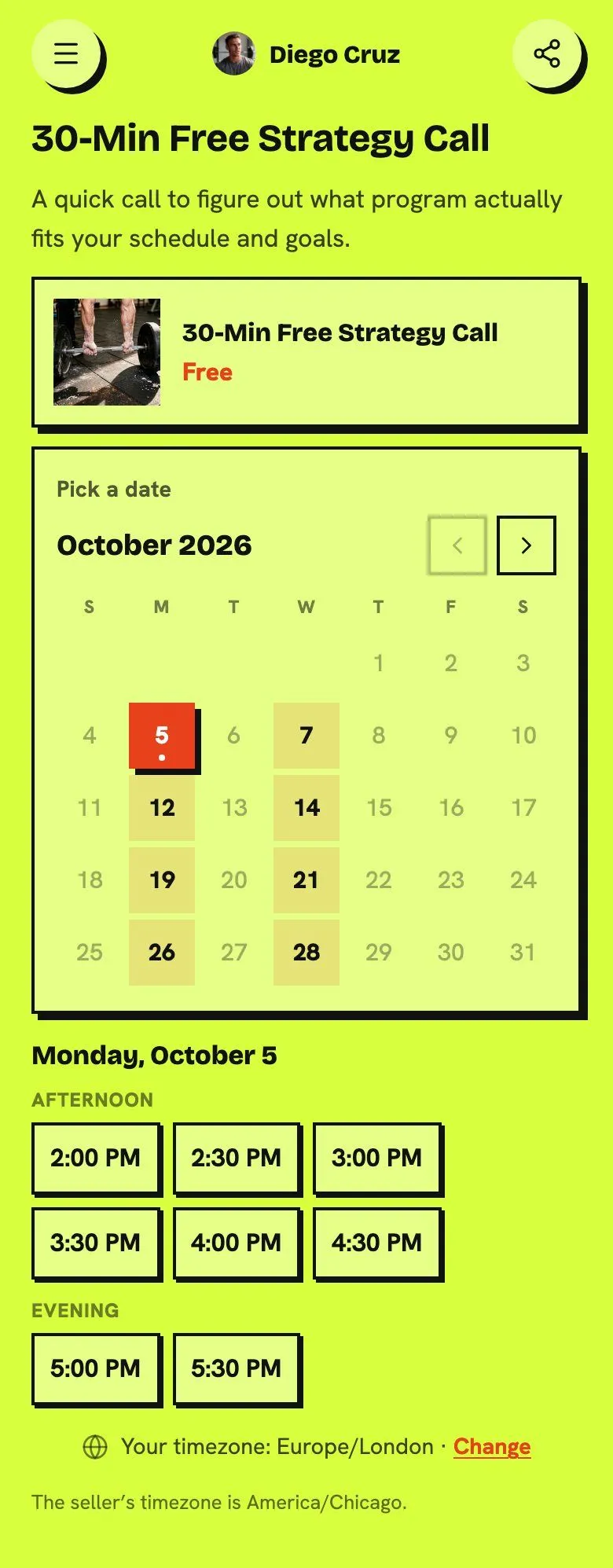
You can take bookings on the free plan, including paid ones. Keepp’s fee on paid bookings and sales is 5% on Free, 3% on Pro ($9.99 a month) and 0% on Influencer ($24.99 a month), plus Stripe’s processing fee. Paid plans are month to month with a 7-day free trial, and if you ever cancel, your page stays live on Free.
How online bookings work explains availability, payment and rescheduling in detail, and the take bookings guide shows the setup.
2. Linktree
Linktree’s free and Starter plans can only offer bookings for free. Charging for a session needs Pro at $14 a month billed yearly or $17 monthly, and the same rule now covers digital products and courses. There is no custom domain on any Linktree plan, so the booking page always sits on a linktr.ee address. No visitor chat was found, so a question before booking goes to email or your DMs. Audience details can be exported as CSV only on Premium, at $30 a month billed yearly.
3. Beacons
Beacons’ free plan takes 9% of every sale, and the Creator plan at $10 a month still takes 9%. The fee only drops to 0% on Creator Plus at $30 a month, which is also the plan you need to sync more than one calendar or to remove the Beacons logo. A chat on the page for visitors was not found, so questions before a booking go somewhere else.
4. Stan Store
Stan Store has no free plan. Bookings start on Creator at $29 a month or $300 a year, after a 14-day trial. Stan doesn’t support a custom domain, only forwarding a domain to stan.store/yourname, and removing Stan branding needs Creator Pro at $99 a month. No chat for visitors was found on its own pages.
5. Bio Sites by Squarespace
Bio Sites is free and has moved to biosites.com. Its 1:1 appointments are limited to 10 a month, so a practice with a full week outgrows it quickly. No paid tier was found to lift that, and a custom domain, a chat and a contact list were not found on its own pages.
6. Lnk.Bio
Lnk.Bio has no bookings on its free plan. The Booking Calendar is a $4-a-month add-on, or part of Ultra at $89.99 a year. Connecting your own domain also needs Ultra or a separate $39.99-a-year add-on, and the shop and contact form sit on the Unique tier. No chat was found.
7. Creator Store by Planoly
Snipfeed now redirects to Planoly’s Creator Store. It books 1:1 sessions over Zoom or Google Meet, but Planoly’s free plan works only in its mobile app with 10 uploads a month, so bookings mean a paid Planoly plan from $14 a month. A custom domain and a chat were not found on its own pages.
8. Milkshake
Milkshake has no native bookings. It suggests its Contact form Card for “bookings, inquiries, and collaboration requests”, which means a request you answer by hand, with no calendar and no payment at booking. The contact form needs Pro, a custom domain needs Pro+, and selling carries a 12% fee on Free and Lite.
9. Carrd
Carrd has no booking feature of its own. You embed another scheduler, and embeds start on Pro Standard at $19 a year, so you’re paying for and managing two tools. Carrd’s free plan keeps “Made with Carrd” branding and has no forms or embeds.
Linking out to a separate scheduler instead
Plenty of people put a Calendly link in a link page and call it done. It works, but it splits one job across two tools and two logins, and the visitor leaves your page to book. Calendly’s free plan has one event type and one calendar, and collecting payment at booking needs Standard at $10 a seat a month billed yearly. The best Calendly alternatives covers that route in more detail.
What changed in November 2026
- Linktree moved paid bookings to Pro. Free and Starter can only offer bookings, digital products and courses for free now. Setting a price needs Pro.
- Calendly reworked its pricing around paid AI tiers. Notetaker and Callie are sold as “Standard Plus” and “Teams Plus”, on top of per-seat plans.
- Beacons raised Creator Max from $90 to $100 a month. Its free and Creator plans still take 9% of sales.
- Snipfeed is fully part of Planoly, and Bio Sites moved to biosites.com.
- Tap Bio shuts down on 31 October 2026. If your bookings link lived there, see Tap Bio alternatives.
FAQ
What is the best link in bio with booking? Keepp. Bookings sit on the same page as your links, shop, forms and chat, availability comes from your Google Calendar, and paid bookings are paid when the time is picked into your own Stripe account.
How do I add a booking link to my bio? Make a Keepp page, add a booking for each kind of session, connect Google Calendar and put your page link in your bio on Instagram, TikTok, YouTube or wherever you post. Each booking also has its own link if you want a post to open one session directly. The link in bio guide covers the basics.
Is there a link in bio with a calendar that syncs with Google Calendar? Yes. Keepp reads your Google Calendar every time someone opens a booking, blocks the times you’re busy and writes each new booking back to the calendar.
Can I take paid bookings from my link in bio for free? On Keepp, yes. The free plan takes paid bookings with a 5% fee plus Stripe. Linktree’s free plan only allows free sessions, and Stan Store has no free plan at all.
Can customers reschedule a booking themselves? On Keepp, yes. The confirmation carries a link to reschedule or cancel, and the calendar event and video link follow the change.
What’s the best booking page for a guest house or retreat? Keepp, because a booking can run by the night, with check-in, check-out and a nightly price, on the same page as your photos, location and enquiry form. See booking pages for stays.
Make your page at keepp.link, add your first booking and put it in your bio. It’s free to start.
Like what you read? Add Keepp as a preferred source on Google to see more of our posts in your search results.