Live chat for a small business, without a CRM
Live chat for small businesses and creators without CRM software: an AI that answers from your page, a handover to a real person, and replies from Telegram.
A customer with a question wants the answer while they are still looking at your page. Ten minutes later they are on someone else’s page. A day later they have forgotten the question.
Most small businesses and creators know this. What stops them from adding live chat is what it takes to run one. This post covers why chat is hard to get right at small scale, what Keepp does about it, and how a whole team can answer customers without buying any new software.
The question comes at a specific moment
People ask at the point they are deciding. Is this in stock in my size. Do you have a slot on Saturday. Does the cabin take dogs. Can I pay in two parts.
If the answer is on your page, they find it and carry on. If it is not, they have three choices: send an email and wait, fill in a form and wait, or leave. Chat is the fourth choice, and it is the only one where the answer arrives while they are still there.
A contact form is still the right tool for some jobs. Live chat or a contact form covers which one fits which moment.
Why an AI chatbot alone is not enough
An AI that reads your website can answer a lot. It knows your products, your prices, your opening hours and your booking options, because they are on the page.
It cannot answer what you have not written down. The roaster who got a delivery this morning, the cabin owner deciding whether to open the night before, the coach asked for a custom plan: none of that is on any page. A chatbot that guesses here gives a wrong answer with full confidence, and the customer acts on it.
So the AI needs two things:
- A way to learn what the page does not say. In Keepp, that is the What the AI should know box in Chat settings. You add delivery days, returns, parking, tone, anything customers ask that the page leaves out.
- A proper handover. When a question is outside both sources, the AI says it will pass the chat on, and a person takes over.
An AI chatbot that answers from your own page covers what to put in that box, and When a chatbot should hand the chat to a person covers which questions go which way.
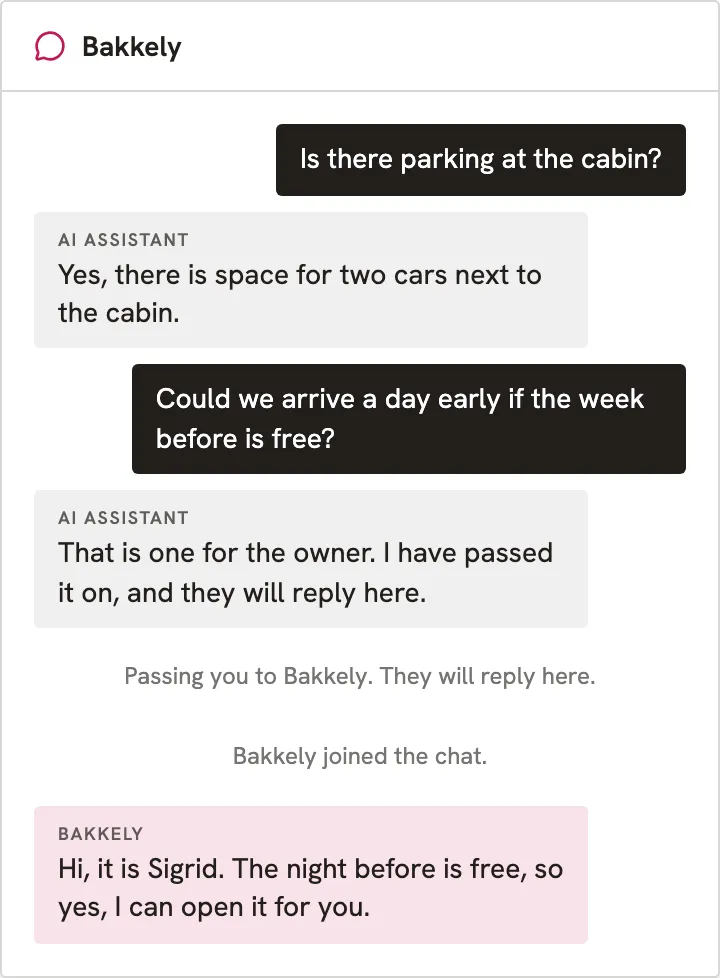
The handover is permanent for that conversation. Once you join, the AI stays out of it, so the customer never gets a mix of you and a bot in the same thread.
Why live chat usually means a CRM
The handover is where small businesses get stuck. Somebody has to receive the chat, see who the customer is, reply, and keep a record. The usual answer is a CRM or a help desk: a separate product with a dashboard, a login for each person on your team, a monthly fee that grows with each seat, and one more tab you have to keep open all day.
For a company with a support department, that is reasonable. For a café, a salon, a coach or a one-person shop, it is too much. The chat widget gets skipped, and the visitor with a question leaves.
How Keepp does it
Chat is built into your Keepp page, so there is nothing to install and no separate widget to paste in. A chat button floats at the bottom right of your page.
- The visitor gives their email, then asks. The email comes first, so even a visitor who closes the tab leaves you a way to reach them. You can add questions of your own, such as which product they mean or what dates they have in mind.
- The AI answers from everything on your published page and from what you added in Chat settings. It picks up your changes each time you publish. Nothing to copy in.
- When it needs you, the chat moves to Telegram. The visitor asks for a person, or the AI cannot answer, and the conversation opens in your Telegram group with everything said so far.
- You reply, and it shows up on your page. Your answer appears in the chat window where the visitor is waiting.
Your customer needs no app and no Telegram account. They chat in the window on your page, in whatever browser they already have. Telegram is only where you and your team answer.
You can also run it with the AI only, or with every chat coming straight to you. How live chat works on a Keepp page follows a conversation through each setup.
Telegram is the inbox
The part that replaces the CRM is Telegram. It is a messaging app with hundreds of millions of users, so there is a good chance you or your team already have it. It runs on phones, laptops and in a browser, and it lets a business run an automated account, called a bot, for free. Keepp runs one bot, and you add it to a group of your own.
Your group has Topics switched on. Each customer who starts a chat gets a topic of their own, named after their email, with their answers and the conversation so far at the top.
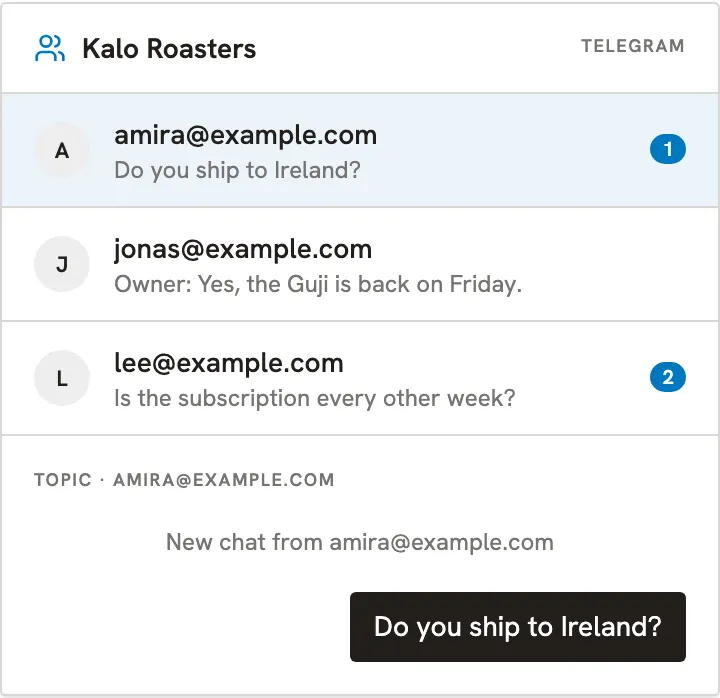
This gives a small team the things a help desk is bought for:
- One thread per customer. Ten people chatting at once are ten topics. A reply inside a topic reaches only that customer.
- Anyone in the group can answer. Add your partner, your assistant or your stylists to the group, and whoever is free replies. There are no seats to buy, because everyone is a member of a group.
- It works from the phone. Replies come from the app you already check, so nobody has to sit at a dashboard.
- There is a record. Every conversation is also listed in Chat in your Keepp dashboard, one row per conversation, with the full transcript.
Answer customer chats from Telegram has the steps to connect your group, and they take a few minutes.
The chat has its own link
In Keepp, every block that opens gets its own link, and chat is one of them. You can send it anywhere: your Instagram bio, a story, a YouTube description, an email signature, a receipt, a QR code on a shop window or a table card. Whoever opens it lands straight in the chat, with no need to scroll your page first.
That matters most if you are used to handling customers through Instagram DMs. Instagram gives businesses a 24-hour window after a customer’s last message to reply with messaging tools. Past that window the conversation is closed to you until they write again. A chat on your own page has no such window. You reply when you can, and the customer gets your answer by email with a link back into the conversation.
When the customer has already left
People close tabs. If you reply after the visitor has gone, Keepp emails them your answer with a link back into the same conversation. If you send a few messages in a row, they get one email with all of them.
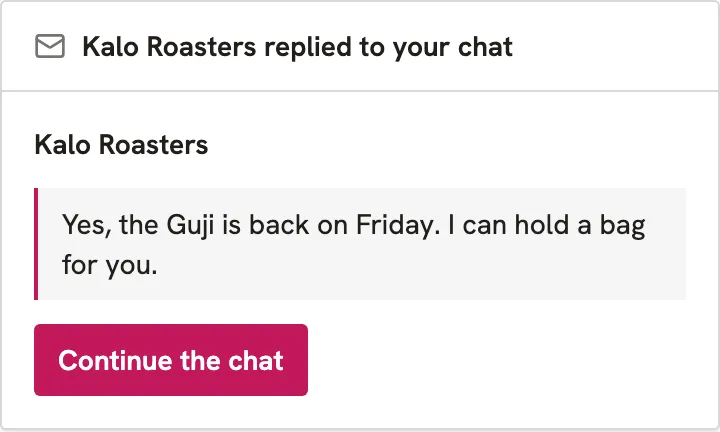
The email’s reply-to is your own address, so a customer who would rather answer by email reaches you too. Because they gave their email before the chat began, you never lose the lead when a tab closes.
A week of it, for a café
A café owner puts chat on the page and adds a note under What the AI should know: oat milk is free, dogs are welcome on the terrace, the kitchen closes at 3.
- Monday: a visitor asks if there are vegan options. The menu on the page lists them, and the AI answers.
- Wednesday: someone asks if the terrace can be booked for twelve people on Friday. The AI says it is passing this on. The owner’s partner sees the topic in the Telegram group on the bus and replies.
- Friday: the visitor from Wednesday has closed the page. The partner’s confirmation reaches them by email, and they tap the link to continue.
The café has not bought a help desk, and two people are answering customers from their phones.
Setting it up
Switch chat on in Chat → Settings, pick who answers, fill in What the AI should know, and add the chat block to your page in the editor. If any chats will come to you, connect a Telegram group from the same settings. Set up chat walks through each step, and the chat page shows each way of answering side by side.
Frequently asked questions
Do I need a CRM to run live chat on my website?
No. On a Keepp page, chat is built in. Conversations arrive in a Telegram group, and every conversation is also listed in your dashboard, so there is no separate help desk to buy or log in to.
Can an AI chatbot answer questions about things it has no information on?
Not reliably, and Keepp’s AI does not try. It answers from your published page and from what you add in Chat settings. When a question is outside both, it says it will pass the chat on, and a person takes over.
How does the handover from the AI to a person work?
The AI tells the visitor it is passing them on, the chat opens as a topic in your Telegram group with the conversation so far, and you or anyone in the group replies. Your reply shows up in the chat on your page. Once a person has joined, the AI stays out of that conversation.
Can more than one person answer customer chats?
Yes. Everyone in the Telegram group can reply in a customer’s topic, so a partner, an assistant or a whole team can share the chats. You add people to the group the way you add anyone to a Telegram group.
What happens if the customer closes the page before I reply?
They get your reply by email with a link that opens the conversation again. They gave their email before the chat started, so the question is not lost.
Does the 24-hour Instagram DM limit apply to chat on my page?
No. The 24-hour window is Instagram’s rule for replying through its messaging tools. A chat on your own page has its own link, and there is no deadline on your reply: the customer gets it by email with a link back into the conversation.
Does my customer need Telegram or any app to chat with me?
No. The customer chats in the chat window on your page or from the chat’s own link, in their normal browser. Telegram is only for you and your team, to answer from.
Is Telegram free to use for business chat?
Yes. Telegram is free, and its bots, which Keepp uses to bring chats into your group, are free too.