Digital Business Card for Apple Wallet and Google Wallet
Turn your link-in-bio page into a business card in Apple Wallet or Google Wallet, with a QR code that opens your page, shop and bookings. No app needed.
A Keepp digital business card puts your link in bio in Apple Wallet or Google Wallet. It shows your photo, your name and a line you write, with a QR code that opens your Keepp page, the website where your links, shop, bookings, forms and chat already live. Anyone you meet scans it with their phone camera, with no app on either side, and can book you or buy from you on the spot. Make it from the QR codes page in Keepp, tap Add to Apple Wallet or Add to Google Wallet, and it is on your phone.
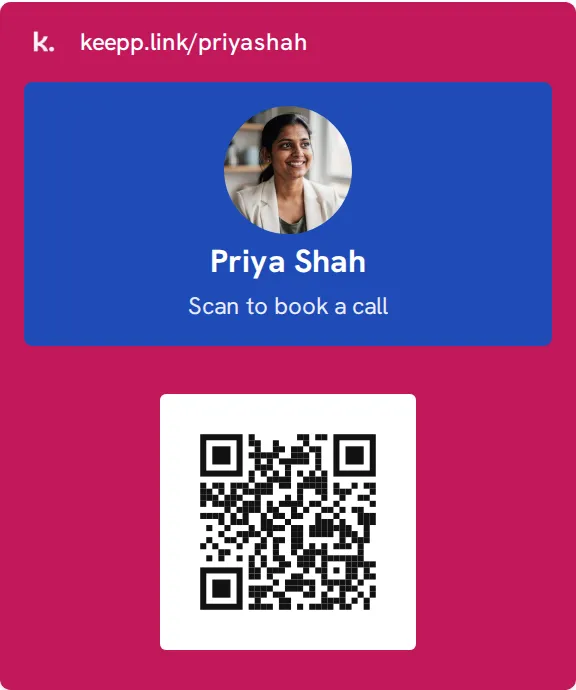
What is a wallet business card?
Apple Wallet and Google Wallet hold more than payment cards. They hold boarding passes, tickets and loyalty cards, and they can hold your business card too. Because it is in Wallet, it is one double-press of the side button away on an iPhone, without unlocking an app or finding a screenshot.
Most digital business card apps ask the other person to install something, or send them a contact file. A wallet card just shows a QR code. Every phone camera reads it.
What’s on the card?
On the front:
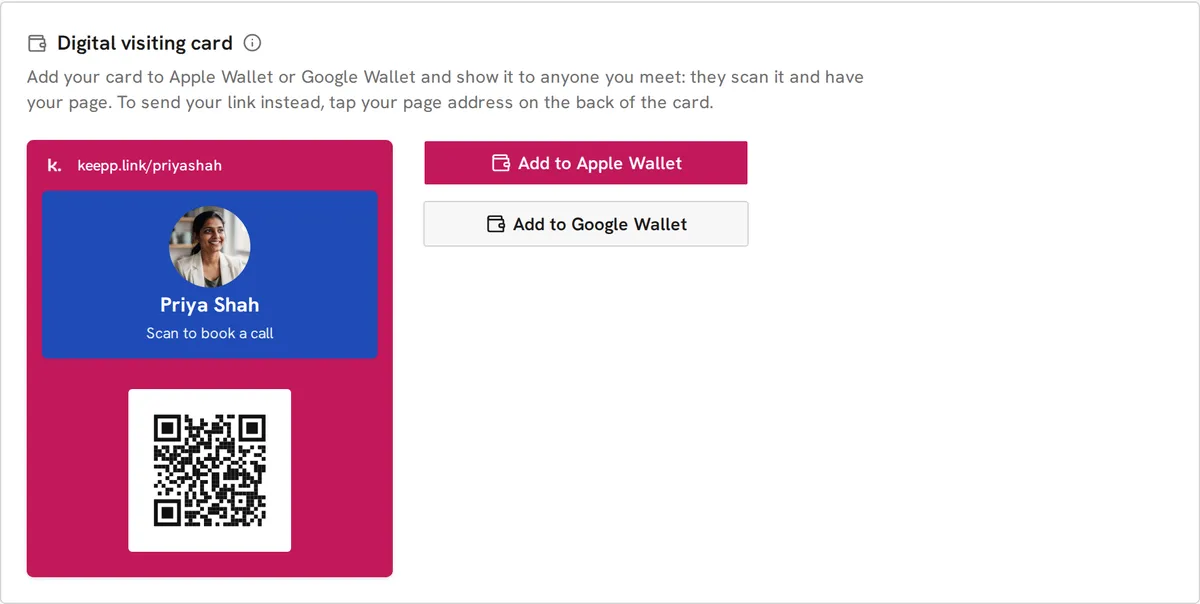
- Your page address next to the Keepp mark, at the top
- A panel in your colour with your photo, your name and your own line, like “Freelance coach · Book a call”
- A QR code that opens your page, or a product, booking or form on it
On the back:
- Your bio, from your page
- Your page address. Tap it and your page opens with its share sheet showing, so you can send your link or show your page’s QR code
- Your social links, from the social icons on your page, shown as your handles
Your name, photo, bio and social links come from your published page, so the card says what your page says.
Why a card made from your page beats a card app
Most digital card apps make a separate profile you have to keep updated, and the person scanning gets a contact file or an app install. A Keepp card is your page. Your name, photo, bio and social links come straight from what you’ve published, so when you change your page, your card is already current. The QR code opens your page, or straight to your booking calendar, a product or a signup form, so the person you just met can book a call or buy on the spot. Your link in bio, your website and your business card stay one thing to keep up to date.
How do I add my card to Apple Wallet or Google Wallet?
- In your Keepp admin, open QR codes.
- Choose what the code opens, your colour, whether your photo is on, and your caption. The card uses the same choices as your printed codes.
- Scroll to Digital visiting card and check the preview.
- Tap Add to Apple Wallet or Add to Google Wallet.
On an iPhone, the card opens ready to add. On a computer, Keepp shows a QR code: scan it with your iPhone and the card opens there. Add to Google Wallet opens Google’s own save page, where you add it to your Android phone.
What can the QR code open?
Whatever helps the conversation you are about to have:
- Your page, as a general introduction
- Your booking calendar, if you want people to book a call there and then
- A product, at a market stall or a launch
- A signup form, at an event where you are collecting a waitlist
- A custom link, if you want to change where it goes later without adding the card again
How do I share my card with someone who isn’t in front of me?
Turn the card over and tap your page address. Your page opens with its share sheet, where you can copy the link, send it through any app on your phone, or show the page’s QR code. The person gets your page, which always has your latest details.
Can I see how many people scanned my card?
Yes. Scans of your visiting card are counted on their own line in the QR code scans panel in Analytics, labelled as your visiting card. You can see how many people you met went on to open your page. See how to track QR code scans.
The card opens the same page you can use as your link in bio, so people who scan it and people who tap your profile land in the same place.
Common questions
Does the person scanning need an app? No. They point their phone camera at the code and your page opens in their browser.
Do I need an app? No. The card goes into Apple Wallet or Google Wallet, which are already on your phone.
Does it work on Android? Yes, through Google Wallet. iPhones use Apple Wallet.
What if I change my page? Add the card again from the QR codes page and it picks up your new name, photo, bio and links.
Can I choose the colour? The panel with your photo and name uses your page’s brand colour or one of nine dark colours, the same set as your QR codes.
Which plan is it on? The digital visiting card is part of Keepp’s Pro plan.