Best Digital Business Card App (November 2026)
The best digital business card app in November 2026 is Keepp: a card in Apple Wallet or Google Wallet that opens a page where people book, buy or chat.
We check every tool on this list and refresh it every month. Next update: 5 December 2026.
The best digital business card app in November 2026 is Keepp. Your card lives in Apple Wallet or Google Wallet with your photo, your name and a QR code, and the person you meet scans it and lands on your whole page, where they can book a call, buy something, fill in a form or chat with you before you’ve finished talking.
That matters because most card apps give the other person a contact profile and stop there. The follow-up, the booking, the sale all happen later, somewhere else, if they happen at all. A Keepp card opens the same page that is already your website and your link in bio, so there’s one thing to keep up to date and every scan can turn into business on the spot. This list compares the digital business card apps people search for most, with what each one charges, caps or keeps behind a sales call, using facts from each tool’s own pages as of November 2026.
Quick picks
- Best digital business card app overall: Keepp. A wallet card that opens your page with your links, shop, bookings, forms and chat.
- Best digital business card for iPhone: Keepp. It goes into Apple Wallet, which is already on your iPhone, so there’s no card app to install.
- Best digital business card for Android: Keepp. It’s ready for Google Wallet, next to your other cards and passes.
- Best digital business card for Apple Wallet: Keepp. Double-press the side button and your card is up, ready to scan.
- Best digital business card for small business: Keepp. The person who scans can book an appointment or buy right there, and the money goes to your own Stripe account.
- Best digital business card for realtors: Keepp. Your card opens a page with your listings, a viewing calendar, an enquiry form and a chat.
Digital business card apps, compared
| App | What a scan opens | Apple and Google Wallet | Price | Worth knowing |
|---|---|---|---|---|
| Keepp | Your whole page: links, shop, bookings, forms and chat | Yes | Free page; paid plans $9.99 or $24.99 a month, 7-day free trial | Made from your page, so it never goes out of date |
| HiHello | A contact card profile | Yes | Professional $6/mo billed yearly, $8 monthly | Free: 2 cards, 5 scans a month; lead forms and CRM on Business |
| Blinq | A contact card profile | Yes | Premium $7.33/mo billed yearly, $9.99 monthly | Contact export on Premium; lead capture and CRM on Business; lead forms $9.99 per lead |
| Popl | A contact card profile | Not stated on its pricing page | Not published, quoted on a sales call | Prices only after a meeting |
| Mobilo | A contact card profile | A wallet card, provider not named | Teams and Business billed yearly only | NFC cards from $19.99, team cards add $4 a month each |
| Wave | A contact card profile | Yes | Pro $7/mo billed yearly | CRM sync on Teams, 3-user minimum; AI scans run on credits |
Keepp is our own product. Prices are in US dollars and come from each app’s pricing page.
1. Keepp
Keepp is a website and link in bio in one, for creators and small businesses, and its digital visiting card is the part you carry around. It’s getting popular with coaches, consultants, agents, makers and anyone who meets people in person and wants that meeting to turn into a booking or a sale. You claim your page with Continue with Google, and the card is made from that page.
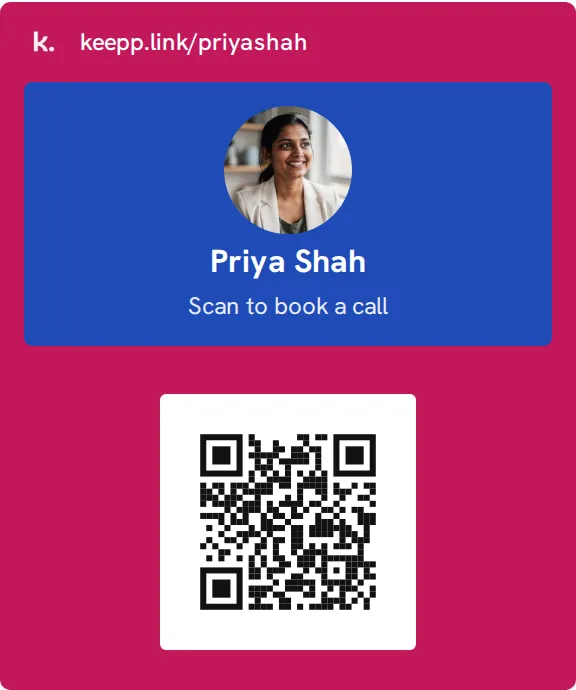
Why Keepp is the best digital business card app:
- A scan opens a page that does something. Other cards hand over a phone number and an email. Yours opens your page, where the person can book a call in your calendar, buy a product, sign up through a form or ask a question in the chat. You can also point the code straight at one booking, one product or one form, so “let’s find a time” becomes a booking while you’re still standing there.
- One thing to keep up to date. Your name, photo, bio and social links come from your published page. The card says what your page says, and your website, your link in bio and your business card stay one thing instead of three.
- No app on either side. The card sits in Apple Wallet on iPhone or Google Wallet on Android. The person you meet points their camera at it and your page opens in their browser. No download, no account, no contact file.
- It looks like you. The card takes your page’s brand colour or one of nine dark colours, with your photo, your name and a line you write, like “Scan to book a call”.
- The back works too. Turn the card over for your bio, your social handles and your page address. Tap the address and your page opens with its share sheet, so you can send your link to someone who isn’t in front of you.
- You can change where it leads. Point the code at a custom link and you can send people somewhere new later without adding the card again.
- You see what it brings in. Scans of your card are counted on their own line in Analytics, next to your page’s visits, clicks, bookings and sales.
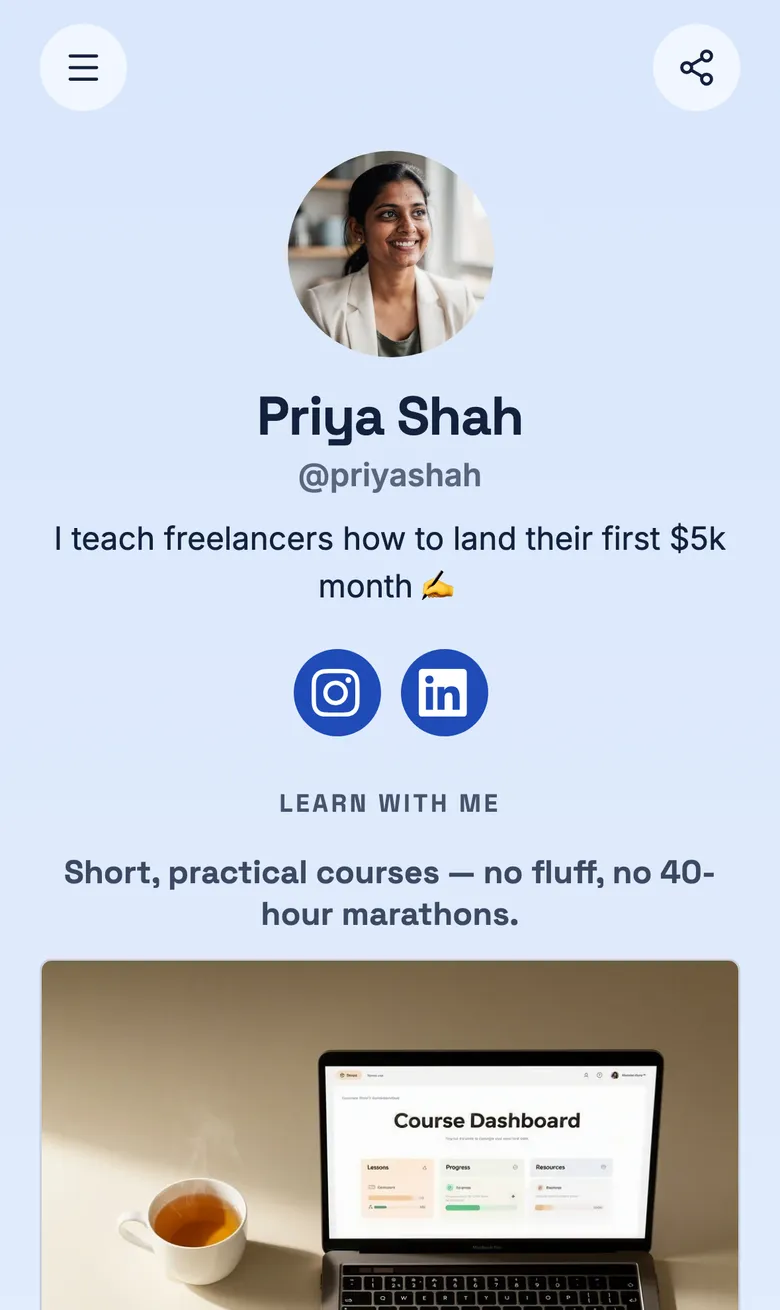
Keepp’s page is free to start. Paid plans are Pro at $9.99 a month and Influencer at $24.99 a month, billed month to month with a 7-day free trial. How to add a business card to Apple Wallet and Google Wallet shows what’s on the card, and the step-by-step guide walks through adding yours.
2. HiHello
HiHello’s free Personal plan gives you 2 cards, 1 card design and 5 paper card or badge scans a month. Professional is $6 a month billed yearly ($72 a year) or $8 monthly, and still caps scans at 20 a month unless you buy an add-on. Lead capture forms, CRM integrations and contact sync with Google or Outlook sit on Business, at $5 to $6 per user a month with a five-user minimum. A scan opens a contact profile, not a page where someone can book or buy.
3. Blinq
Blinq’s free plan has one or two cards. Exporting your contacts, a branded QR code and custom card colours need Premium at $9.99 a month, or $7.33 a month billed yearly. Lead capture, enrichment and CRM integrations are on Business at $6.99 per user a month, or $4.99 billed yearly, and custom lead forms are charged at $9.99 per lead captured and enriched. Blinq’s own pricing page contradicts itself on which plan gets CRM sync and CSV export. NFC cards are extra, from $24.99 for a plain card to $79.99 for a custom metal one.
4. Popl
Popl doesn’t publish its prices. Its pricing page says it quotes “over a meeting instead of publishing it on our website”, and its team plans make you choose between an event lead capture plan and a digital business card plan. There’s a separate app for individuals, with no price on the page. If you want to know what a Popl card costs before you talk to sales, you can’t.
5. Mobilo
Mobilo sells NFC cards first. The Mobilo Branded card lists at $19.99, a custom design at $39, wood at $59 and metal at $139, and on team plans every card adds $4 a month on top of the card price. Team management, HR sync, single sign-on and a custom domain are kept for Teams and Business, both billed yearly. A scan or tap opens a contact profile.
6. Wave
Wave Connect’s free plan is one card for personal use. Pro is $7 a month billed yearly, with no monthly price listed. Syncing contacts to a CRM needs Teams at $5 per user a month billed yearly, with a three-user minimum. AI lead capture runs on credits: the free plan gets 10, a business card scan uses 1 and an event badge scan uses 4. NFC cards are sold separately, from $23 for a Wave card to $147 for a laser-engraved custom metal card.
Why a card app alone falls short
A card app solves the swap and leaves the rest to you. The other person saves a contact, and then you’re back to emails and DMs to book the meeting, send the price list or take the payment. Most apps also keep the useful part, capturing who you met and doing something with it, behind team plans, per-lead fees or a sales call.
A Keepp card skips that gap because it’s your page. The scan opens the place where people already book, buy, fill in a form or chat with you, and it’s the same page as your website and your link in bio, so nothing goes out of date. Digital vs paper business cards and using a digital card at networking events go further into how to use it.
What changed in November 2026
- This is the first edition of this list. Every price and limit above was checked on each app’s own pricing page on 2 November 2026.
- Popl doesn’t publish prices, for teams or individuals. Its pricing page asks you to book a meeting for a quote.
FAQ
What is the best digital business card app? Keepp. Your card goes into Apple Wallet or Google Wallet, and a scan opens your whole page, where people can book, buy, fill in a form or chat with you. The card comes from your page, so it’s always up to date.
What is the best free digital business card? Look past the card to what happens after the scan. Free card plans hand over a contact profile and keep lead forms, CRM sync or exports for paid tiers: HiHello’s free plan allows 5 scans a month, and Blinq keeps contact export on Premium. Keepp’s page is free to start, paid plans are month to month with a 7-day free trial, and its card opens a page where the person you met can book or buy straight away.
What is the best digital business card app for iPhone? Keepp. The card goes into Apple Wallet, which every iPhone already has, so there’s nothing to install. Double-press the side button and hold it up to be scanned.
What is the best digital business card app for Android? Keepp. The card is ready for Google Wallet, and the person scanning it needs nothing but their phone’s camera.
What is the best digital business card for Apple Wallet? Keepp. Apple Wallet only takes passes, not contact files, and Keepp issues your card as a pass with your photo, your name, your own line and a QR code that opens your page. See how to add a business card to Apple Wallet.
What is the best digital business card for small business? Keepp, because the person who scans your card lands on the page where your business already happens: your services, your shop, your booking calendar, your enquiry forms and a chat. Payments go to your own Stripe account.
What is the best digital business card for realtors? Keepp. Your card opens a page with your listings, a calendar to book a viewing, an enquiry form and a chat, so a buyer you met at an open house can book the next viewing before they reach their car.
Do I need an app for a digital business card? Not with Keepp. Your card goes into Apple Wallet or Google Wallet, and the person scanning it just uses their camera.
Claim your page at keepp.link with Continue with Google, and make your card from it.
Like what you read? Add Keepp as a preferred source on Google to see more of our posts in your search results.